Home
» Knowledge
»
How to Stake Your Crypto on Kraken for Passive Income
How to Stake Your Crypto on Kraken for Passive Income
Updated September 16, 2026. Kraken lets eligible customers earn crypto rewards through several products shown under Earn, but not every Earn product is the same thing as staking. On-chain staking uses supported proof-of-stake networks, while products such as Opt-In Rewards follow separate terms. If your goal is specifically to stake crypto on Kraken, the safest practical approach is to start from Kraken Pro’s Earn section, confirm that the asset and staking strategy are available in your region, and review the liquidity and reward terms before allocating.
Quick answer: how to stake crypto on Kraken
On Kraken Pro web, the current official flow is straightforward: sign in, open Earn, select a supported asset, enter the amount, choose Flexible or Bonded staking when both are offered, review the details, and confirm. Kraken requires a verified account, and availability depends on your location and the asset. The company’s current Kraken Pro staking instructions describe this flow directly.
Decision
What to check
Why it matters
Asset
Is on-chain staking offered for this token?
Not every crypto asset in Earn is a staking asset.
Strategy
Flexible, Bonded, or another Earn product?
Liquidity, rewards, and terms differ.
Reward rate
Current displayed estimate and Kraken commission
Displayed rates can change and are not guaranteed.
Exit time
Any protocol unbonding period?
Bonded assets may not be immediately tradable or withdrawable after you unstake.
Eligibility
Country/state restrictions and account verification
Features vary by jurisdiction.
Before you stake: a practical checklist
Use a verified Kraken account and enable strong account security, including two-factor authentication.
Hold the supported crypto in your Kraken account before attempting to stake it.
Confirm that staking is available where you live. Geographic restrictions can change.
Decide how much liquidity you need. Do not use a bonded option if you may need immediate access to the entire position.
Read the reward estimate as an estimate, not a promised return.
Check the commission and any unbonding period shown for the specific asset before confirming.
Consider tax reporting obligations in your jurisdiction; staking rewards can have tax consequences.
Kraken’s Global Terms of Service state that staking rewards are not guaranteed, can vary by protocol, are subject to Kraken’s staking fee, and may be affected by interruptions or protocol events. Those terms also describe liquidity, smart-contract, and other staking risks.
Step 1: Open Earn in Kraken Pro
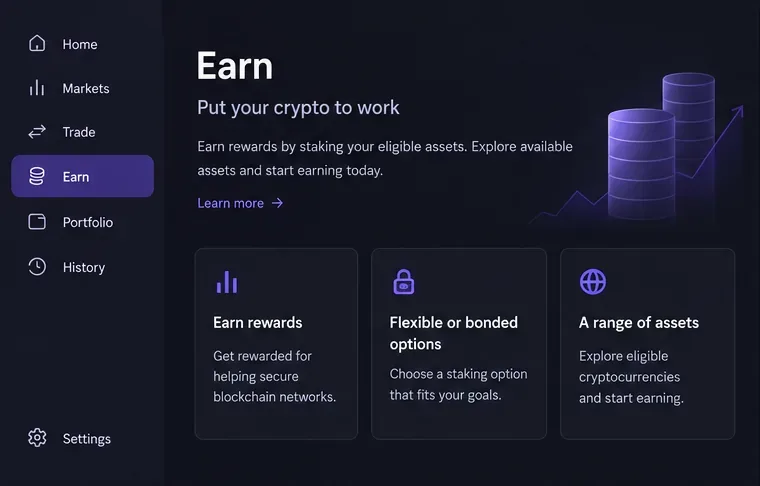
Sign in to Kraken Pro on the web and select Earn from the left sidebar. This is the starting point for the current Kraken Pro staking flow. If Earn or staking is not visible, do not assume the interface is broken: your account, jurisdiction, or the selected asset may not be eligible.
Start in the Earn area of Kraken Pro. The exact assets and options shown in your account can differ by region and eligibility.
Step 2: Choose an eligible staking asset
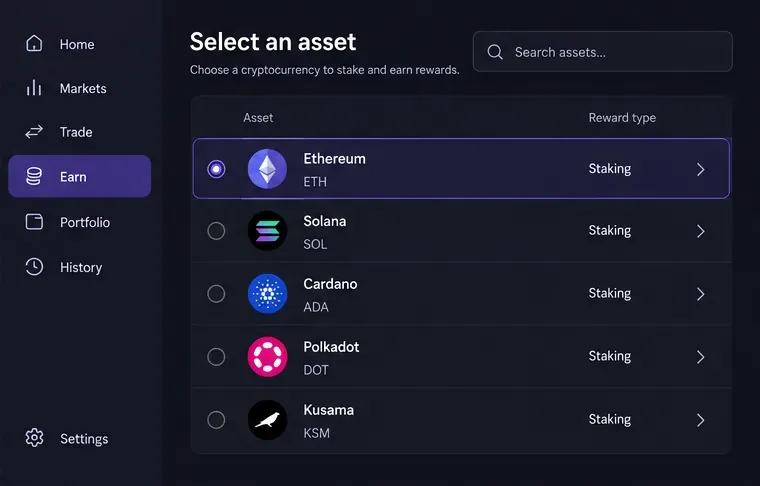
Select the crypto asset you want to stake. Kraken’s current instructions say you can choose from the available assets or use the staking search function. Before continuing, verify that the reward type is actually staking. This matters because Kraken also offers other ways to earn rewards that may appear in a similar area of the interface.
For example, Kraken explicitly says Opt-In Rewards is separate from staking. Opt-In Rewards can include flexible or fixed-rate products, but those balances are governed by different terms and are not simply proof-of-stake network participation.
Choose the asset you intend to stake and verify that the product is labeled as staking, not merely another Earn strategy.
Step 3: Compare Flexible and Bonded staking
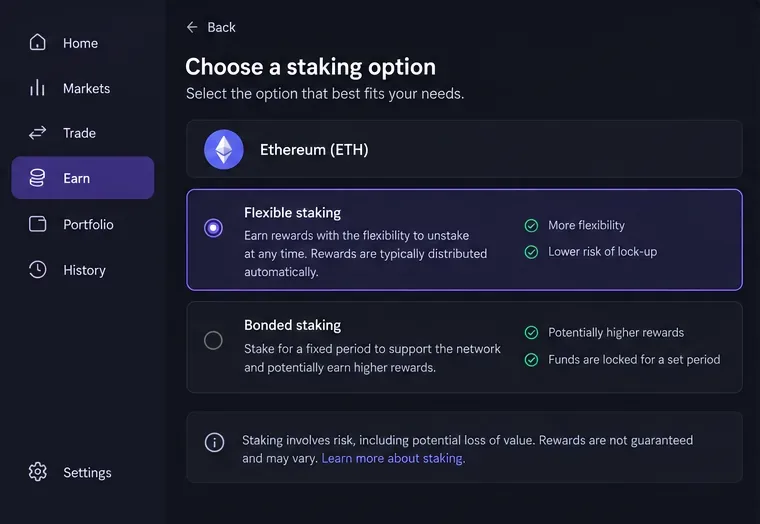
If Kraken offers both choices for your asset, compare them before allocating. Flexible staking is designed to provide greater access to your assets, while Bonded staking can expose you to an on-chain unbonding period after you request to unstake. The exact mechanics depend on the token and protocol.
Kraken’s current staking overview says there are no transaction fees simply for staking or unstaking, but Kraken takes a commission from network rewards. The applicable commission depends on the product and may vary by region, asset, and staking balance, so use the percentage shown in your own account as the operative figure. Kraken also states that quoted annual reward rates are estimates rather than guarantees.
Compare access to funds, reward terms, and any unbonding conditions before choosing Flexible or Bonded staking.
Step 4: Enter the amount and review before confirming
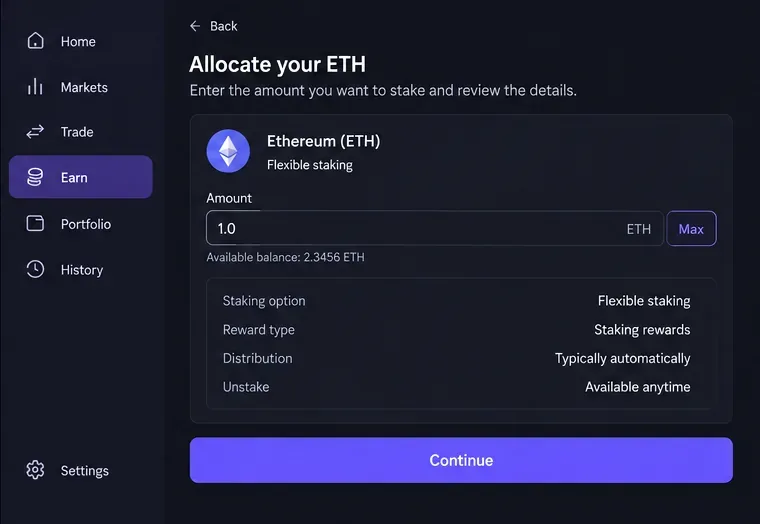
Enter how much of the asset you want to allocate. Review the asset, amount, strategy, reward information, and exit conditions before you confirm. If you are testing the process for the first time, allocating a smaller amount can help you learn how rewards, account history, and unstaking work without committing your entire balance.
The Kraken Pro mobile app uses a similar sequence: Portfolio, Earn, asset selection, strategy selection, amount entry, review, and allocation. Kraken documents the mobile flow in its Kraken Pro app staking and unstaking guide.
Enter the amount, read the staking details, and confirm only after the strategy and liquidity terms match your plan.
What “passive income” means in crypto staking
Staking can generate recurring crypto rewards without active trading, which is why it is often described as passive income. That phrase can be misleading if it suggests a savings account with a fixed yield. Your economic result depends on at least three moving parts: how many tokens you receive as rewards, the fees or commissions deducted from those rewards, and the market value of the token itself.
A 5% token-denominated reward does not guarantee a 5% dollar return. If the token’s market price falls substantially, the value of your total position can still decline. Conversely, a higher token price can increase the dollar value of both principal and rewards. Treat the displayed annual rate as one input, not as the entire return calculation.
Flexible vs. Bonded staking: which structure fits your use case?
Use case
Flexible may fit when
Bonded may fit when
Need trading access
You may want to sell, withdraw, or rebalance quickly.
You are comfortable waiting through the protocol’s exit process.
Long-term holding
You still want liquidity while earning rewards.
You can tolerate restricted access in exchange for the available bonded terms.
Market volatility
You value the ability to react sooner.
You accept that the market can move while assets are unbonding.
Operational simplicity
You want a more liquid setup.
You are willing to monitor unlock or unbonding conditions.
There is no universal best choice. Your time horizon and need for liquidity matter more than chasing the highest displayed rate.
How Kraken rewards and commissions work
Kraken says staking rewards are generally distributed weekly, but rates can change. The company’s public staking page shows estimated annual rates for supported assets and notes that projected rates are based on prior staking rewards and are subject to change. You can review current assets and rates on Kraken’s official staking page.
Do not copy a rate from an old article into your decision. Use the rate and commission displayed in your Kraken account immediately before you allocate. This is especially important because Kraken has changed fee structures and product availability over time, and regional versions of the service can differ.
Auto Earn is convenient, but check what it activates
Kraken also offers Auto Earn. According to its Auto Earn overview, enabling the feature can automatically allocate eligible assets across available reward programs in your region, which may include staking, Opt-In Rewards, and stablecoin reward programs. Rewards accrue daily and are generally paid weekly.
That can reduce manual work, but it makes product identification even more important. If your intention is specifically to participate in on-chain staking, verify which program is generating rewards for each asset rather than assuming every Auto Earn reward comes from staking.
How to unstake on Kraken
On Kraken Pro, go back to your Earn holdings, select the asset, choose the unstake or deallocate action, enter the amount, review the request, and confirm. Flexible positions may be available much sooner, while bonded positions can remain unavailable during a protocol-defined unbonding period. Kraken’s terms warn that market prices may move materially while you wait.
Before initiating a bonded stake, check the actual unbonding period shown for that asset. This is one of the most important details for anyone who expects to use the funds on short notice.
Common mistakes to avoid
Confusing Earn with staking. Kraken groups several reward products under Earn, but their legal and economic structures differ.
Choosing the highest rate without checking liquidity. A higher advertised rate can come with restrictions that matter more than the incremental yield.
Ignoring Kraken’s commission. The gross network reward is not necessarily the amount you receive.
Assuming rewards are guaranteed. Kraken explicitly states that reward rates are estimates and staking rewards are not guaranteed.
Forgetting token price risk. Staking rewards do not prevent the underlying crypto asset from losing value.
Relying on old availability information. Supported assets, rates, and regional restrictions can change.
Bottom line
To stake crypto on Kraken, use the Earn section in Kraken Pro, choose an eligible staking asset, compare Flexible and Bonded terms, enter the amount, and review the reward, commission, and exit conditions before confirming. For a long-term holder, staking can be a relatively hands-off way to earn additional units of a crypto asset, but it is not risk-free income and it is not equivalent to an insured bank deposit.
Before every new allocation, re-check Kraken’s live interface and official documentation. The most important practical questions are simple: What product am I entering, what will I receive after commissions, and how quickly can I get my asset back? If those three answers are clear, you are in a much better position to decide whether staking fits your plan.