Home
» Knowledge
»
Phishing Scams in Web3: How to Protect Your Crypto Wallet Without Relying on Guesswork
Phishing Scams in Web3: How to Protect Your Crypto Wallet Without Relying on Guesswork
Web3 phishing is dangerous because a scammer does not always need your password. In a self-custody wallet, the attacker may instead try to obtain your Secret Recovery Phrase, trick you into connecting to a fake decentralized application (dapp), or persuade you to approve a transaction or token allowance that gives a malicious contract access to your assets.
The goal of good wallet security is therefore not to memorize every scam. It is to build a process that produces a better outcome even when the message, website, or transaction looks convincing. A practical standard is this: before you sign anything, you should know who you are interacting with, what the wallet request will authorize, how much value is exposed, and what you will do if something looks wrong.
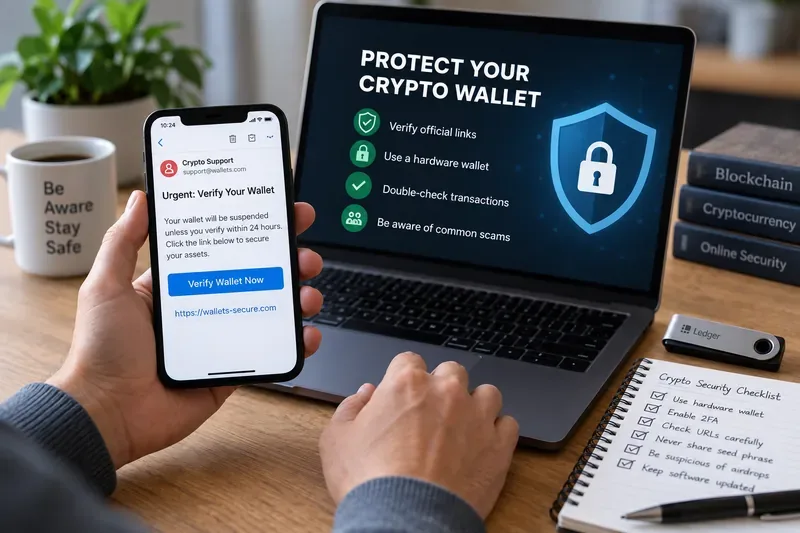
A suspicious “verify your wallet” message is a reason to stop and independently verify the source before connecting, signing, or entering recovery information.
What Web3 phishing is trying to make you do
Phishing is a social-engineering attack: the scammer creates a believable reason for you to take an action that benefits the attacker. In Web3, that action can be more consequential than clicking a bad link. A fake site can ask you to reveal a recovery phrase, sign a message, approve a token allowance, or authorize a transaction that moves assets.
Coinbase warns that phishing sites can imitate legitimate services and may be distributed through email, text messages, social media, and search-engine ads. Its wallet guidance also emphasizes checking the exact dapp URL and never sharing a recovery phrase. See the Coinbase Wallet guidance on avoiding crypto scams.
MetaMask similarly describes spoofing attacks in which fake support accounts imitate official staff and ask users for their Secret Recovery Phrase. A recovery phrase can restore the wallet and expose the associated private keys, so handing it to another person or website can give them control of the wallet. See MetaMask's guidance on spoofing scams.
The four outcomes your security process should achieve
1. Your recovery phrase never leaves your control
Your recovery phrase, sometimes called a seed phrase or Secret Recovery Phrase, is the backup secret that can restore a self-custody wallet. The most important test is simple: no support agent, website, form, chatbot, airdrop page, or “wallet verification” process should receive it.
If someone asks for it, the correct outcome is not “I checked the logo and it looked real.” The correct outcome is that you refuse to provide it and independently navigate to the provider's official support site. MetaMask states that its support representatives will never ask for a Secret Recovery Phrase, and Coinbase similarly states that support will not ask for a seed phrase. See MetaMask's official support guidance and Coinbase's phishing guidance.
2. You verify destination and intent before signing
A hardware wallet can protect private keys from being directly exposed to a computer, but it cannot decide whether a transaction is economically safe for you. If you approve a malicious transaction, the device may faithfully sign exactly what you told it to sign.
This is why readable transaction information matters. Ledger describes “clear signing” as presenting transaction details such as the action, recipient, and amount in human-readable form before approval. The security benefit comes from comparing those details with what you intended to do. See Ledger's explanation of clear signing.
A useful pass/fail test before signing is: can you explain, in plain language, what the request will do? If the wallet shows an unfamiliar contract, unlimited spending access, an unexpected recipient, or opaque data that you cannot meaningfully verify, the safer result is to stop rather than treat the confirmation screen as a formality.
3. A compromised dapp cannot automatically reach everything
Token approvals are permissions that allow a smart contract to spend a specified token on your behalf. They are often necessary for decentralized exchanges, staking applications, and other dapps, but overly broad approvals increase the amount that could be exposed if a contract or site turns out to be malicious.
MetaMask explains that disconnecting a wallet from a dapp is not the same as revoking a token approval. Disconnecting can remove a site's access to wallet information, but an existing on-chain allowance may remain active. Its documentation recommends reviewing allowances and revoking unwanted approvals. See MetaMask's guide to revoking token approvals.
The measurable outcome here is smaller blast radius. If you rarely use a dapp, an old unlimited approval should not remain simply because you forgot about it. Review approvals periodically and remove permissions you no longer need. When the wallet or dapp supports a limited spending amount, use the smallest practical allowance instead of defaulting to unlimited access.
4. You can contain damage quickly
No security routine eliminates every risk. You need an incident plan before anything happens. If you see an unauthorized transaction, a malicious approval, or evidence that your recovery phrase has been exposed, the priority changes from prevention to containment.
MetaMask's compromised-wallet guidance says that unauthorized transactions can indicate wallet compromise and recommends moving remaining funds to a secure wallet, discontinuing use of the compromised wallet, and reporting the scam. It also notes a hard limitation of self-custody: blockchain transactions generally cannot be reversed by the wallet provider. See MetaMask's compromised-wallet guidance.
A practical phishing check before you connect or sign
Use the following checklist as a decision gate, not as a guarantee. Passing every item lowers obvious risk, but a legitimate-looking site or contract can still be compromised.
Check
Good sign
Reason to stop
Source
You reached the site from a saved official bookmark or verified project channel
You arrived through an unsolicited DM, email link, ad, or “support” reply
Domain
The exact domain matches the official project
Misspelling, extra word, unusual subdomain, or shortened link
Recovery phrase
No request for it
Any request to type, upload, “sync,” or verify it
Wallet request
The action matches what you intentionally initiated
Unexpected signature, approval, chain switch, or transaction
Recipient and amount
They match your intended transaction
Unknown recipient or amount
Token access
Allowance is limited to what the action requires
Unlimited or unexplained approval
Pressure
You have time to verify independently
Threats, countdowns, urgent “account suspension,” or guaranteed reward
Why “the URL looks right” is not enough
Checking the domain is essential, but it is only one layer. Attackers can compromise social accounts, buy search ads, imitate support staff, or direct users to pages that look professional. A correct-looking page can also contain a malicious or compromised smart-contract interaction.
For higher-value transactions, use two independent checks. For example, open the project from a saved bookmark and separately verify the contract or announcement through an official project channel. Do not use two links from the same suspicious message and call that independent verification.
Wallet security alerts can help, but they are not guarantees. MetaMask explicitly states that trust signals and security alerts are informational and do not guarantee safety. If an address or site is flagged as malicious, do not connect or sign. If no warning appears, you still need to verify the interaction yourself. See MetaMask's security-alert documentation.
When to change your approach
A security process should become stricter as the potential loss increases. A wallet holding a small amount for experimenting with dapps does not need to have the same operating model as a wallet holding long-term savings.
Use a separate interaction wallet when you regularly test new dapps, mint NFTs, claim airdrops, or sign unfamiliar messages. Keep only the amount needed for those activities.
Move long-term holdings away from frequent dapp activity when one compromised approval could expose an amount you are not willing to lose.
Use a hardware signer and verify its screen when transaction values justify the extra friction. The benefit depends on reviewing the displayed details, not merely owning the device.
Revoke old approvals when you stop using a dapp, especially where the allowance is broad or unlimited.
Abandon a wallet and migrate if its recovery phrase or private key has been exposed. Changing a wallet-app password does not make an exposed seed safe again.
Red flags that justify stopping immediately
Some signals are strong enough that further interaction is unnecessary. Stop if a supposed support agent asks for your recovery phrase, password, two-factor authentication code, remote-access software, or a transfer to a “safe” wallet. Coinbase explicitly lists these behaviors as things its customer-service agents will not request.
Also stop when a message creates artificial urgency, promises an unusually large reward, or asks you to sign something unrelated to the action you initiated. A common phishing advantage is speed: the attacker wants you to act before you verify.
What to do if you already clicked or signed
Clicking a link is not automatically the same as losing funds. What matters is what happened afterward. If you only opened a page and did not enter a recovery phrase, install software, connect a wallet, sign a message, approve a token allowance, or authorize a transaction, your exposure may be lower. Close the site, review browser and device security, and return to the service through an independently verified URL.
If you connected the wallet, inspect active permissions. If you approved token spending, review and revoke suspicious allowances. If you signed a transaction, inspect it on the appropriate block explorer to understand what was authorized. If your recovery phrase or private key was exposed, treat the wallet as compromised and move remaining assets to a newly secured wallet as soon as practical.
Do not expect a wallet provider to reverse an on-chain transfer. Self-custody means you control the keys, but it also means providers generally cannot undo a valid blockchain transaction after it has been confirmed.
How to tell whether your wallet security is improving
You do not need a complicated score. Track a few observable outcomes:
You can identify the official route to every dapp you regularly use without relying on search ads or unsolicited links.
Your recovery phrase is stored offline and has never been entered into a website or sent to another person.
You can explain each transaction or approval before signing it.
Your high-value wallet is not routinely connected to experimental dapps.
Your approval list does not contain unnecessary old permissions.
You have a written response plan for a compromised seed, malicious approval, or unauthorized transaction.
If you cannot meet one of those outcomes, improve that specific control instead of adding more security tools at random.
Limits: no wallet setup can make phishing impossible
Security tools reduce risk; they do not remove the need for judgment. A hardware wallet can protect private keys but cannot stop you from intentionally signing a harmful transaction. A browser warning can miss a new phishing domain. A legitimate dapp can suffer a compromise. A familiar social account can be hijacked. Token approvals can remain valid after you disconnect from a site.
The broader threat remains substantial. In April 2026, the FBI reported that cryptocurrency-related complaints in its 2025 Internet Crime Report represented more than $11 billion in reported losses, while phishing and spoofing were among the most frequently reported complaint types overall. Those figures cover broader categories and should not be read as phishing-only crypto losses, but they show why verification and incident readiness matter. See the FBI's April 6, 2026 release on the 2025 Internet Crime Report.
A safer default for everyday Web3 use
The strongest everyday habit is not “never click anything.” It is to separate discovery from authorization. You may discover a project through social media, a search result, or a message, but do not authorize a wallet action from that same unverified path. Independently navigate to the official project, verify the domain, inspect the wallet request, limit permissions, and sign only when the transaction matches your intent.
If the process feels rushed or unclear, stopping is a successful security outcome. In Web3, refusing one transaction costs far less than approving the wrong one.