Solana Ecosystem Analysis: Can It Sustain Its Q4 2026 Momentum?

Solana’s 2026 ecosystem is expanding across DeFi, stablecoins, RWAs, and payments. Here’s what could sustain—or weaken—its Q4 momentum.
Cos'è Coin98 Exchange 2.0? Una guida AZ su come utilizzare Coin98 Exchange con 4 caratteristiche principali: Exchange, Markets, Portfolio e Terminal.
Coin98 Exchange 2.0 è il prodotto di nuova generazione di Coin98 Labs nei nostri continui sforzi per adempiere alla missione di ottimizzare le esperienze degli utenti e promuovere l'adozione di massa della DeFi.
In questo articolo, condividerò con te una panoramica di Coin98 Exchange 2.0 e una guida AZ su come provare questa piattaforma di aggregazione di liquidità multichain all'avanguardia!
Cos'è Coin98 Exchange 2.0?
Coin98 Exchange 2.0 è un exchange decentralizzato (DEX), un aggregatore di liquidità multi-catena. Oltre a mantenere le funzionalità avanzate delle versioni precedenti, Coin98 Exchange 2.0 aggiunge un meccanismo Super Link per aggregare la liquidità, trovando così il percorso più breve e il miglior prezzo per gli utenti in una sola transazione.
Coin98 Exchange 2.0 nasce per risolvere il problema della frammentazione della liquidità su molte Blockchain, aiutando gli utenti a vivere la DeFi in modo completo e senza soluzione di continuità senza la necessità di una conoscenza approfondita della tecnologia blockchain.
Conosciuto come una versione decentralizzata e non detentiva dei principali CEX sul mercato, Coin98 Exchange 2.0 sta gradualmente portando alla DeFi servizi essenziali nell'economia tradizionale come:
Specialità di Coin98 Exchange 2.0
Integra le migliori fonti di liquidità del mercato..
Coin98 Exchange 2.0 è un prodotto che intende ampliare e approfondire la propria portata. Attualmente, il prodotto ha integrato fonti di liquidità sulle prime 9 blockchain come Ethereum, BNB Chain, Solana, Polygon, Avalanche C-Chain, KCC, Fantom, Boba Network e Heco Chain, supportando gli utenti nel trading su più catene nel prodotto Coin98.
Semplice e facile da usare.
Coin98 Exchange 2.0 è stato ora rinnovato con un'interfaccia intuitiva e intuitiva che semplifica l'utilizzo e la comprensione del processo di transazione del prodotto da parte degli utenti. Senza gas, slippage, impatto sui prezzi, AMM e altre informazioni sono tutte chiaramente mostrate.
Ottimizzazione tariffa gas
Nella nuova versione, Coin98 Exchange 2.0 ottimizza automaticamente i prezzi dei token swap, le commissioni del gas e la velocità delle transazioni. Inoltre, a seconda delle tue esigenze, puoi regolare manualmente la tariffa del gas regolando la barra del gas.
Meccanismo avanzato
Il meccanismo di confronto consente agli utenti di effettuare scambi di monete/token con il miglior prezzo e il minor slippage tra le fonti di liquidità. Quando si effettua una transazione, il meccanismo di instradamento intelligente calcola per creare il percorso per aiutare gli utenti a ottenere il miglior profitto in una transazione.
Sito unico
Come altre funzionalità dei prodotti Coin98'ư, Coin98 Exchange 2.0 ha anche un sito Web per consentire agli utenti di Coin98 Extension di sperimentare liberamente questo nuovissimo scambio decentralizzato. Attualmente, il prodotto è in fase di sviluppo. Gli utenti possono provarlo sullo scambio nativo della Super App Coin98.
Assistenza clienti
Coin98 Exchange 2.0 ha un team di Servizio Clienti in 12 lingue diverse, online 24 ore su 24, 7 giorni su 7 su più piattaforme, incluse 12 community per 12 lingue su Telegram.
Cosa devi preparare prima di provare Coin98 Exchange 2.0?
Il cuore di Coin98 Exchange 2.0 è il motore multichain, che connette gli utenti a molti blockchain diversi senza sforzo e senza intoppi. Gli utenti possono anche utilizzare portafogli a catena singola come portafogli ETH o BSC per fare trading, tuttavia, Coin98 Exchange consiglia di utilizzare portafogli multi-catena per una migliore esperienza utente.
Inoltre, gli utenti possono godere dell'esperienza unica "Always Connected" tramite l'assoluta compatibilità del Multichain Engine tra Coin98 Wallet e Coin98 Exchange.
Scarica e installa la Super App Coin98
Coin98 Exchange 2.0 è ora disponibile su Coin98 Super App per utenti iOS e Android:
Leggi le istruzioni dettagliate su come utilizzare Coin98 Super App o guarda il video tutorial per installare Coin98 Super App
Scarica e installa Coin98 Extension Wallet
Puoi accedere a chrome.coin98.com per installare il portafoglio di estensione Coin98.
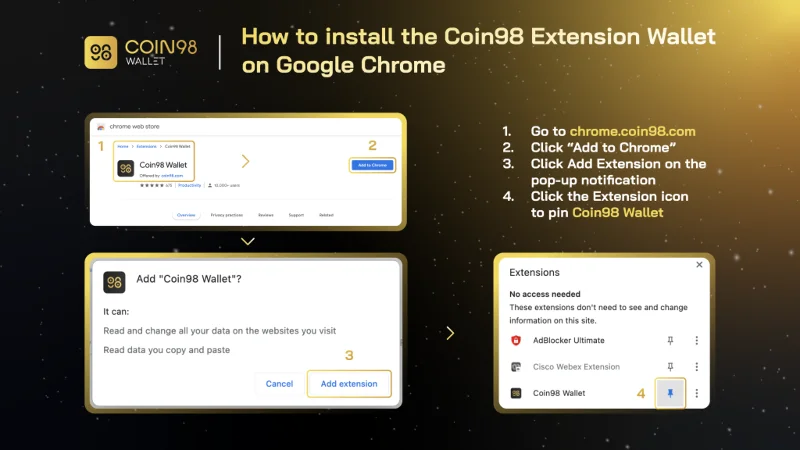
Come installare Coin98 Extension Wallet
Per istruzioni sull'installazione e l'utilizzo dell'estensione Coin98 Wallet, puoi fare riferimento a questa guida.
Crea un portafoglio multicatena
Dopo aver scaricato o aggiornato il portafoglio di estensione Coin98, puoi seguire le istruzioni seguenti per creare un portafoglio multi-catena o importare un portafoglio da altre applicazioni di portafoglio su Coin98 Wallet.
Se sei attualmente un utente di Coin98 Wallet, reimporta il tuo portafoglio multichain per aggiornare altri nuovi chain wallet disponibili nell'ultima versione!
Prepara la moneta nativa delle blockchain per le commissioni di transazione
Per poter utilizzare Coin98 Exchange 2.0, devi preparare le commissioni del gas per ogni blockchain che desideri utilizzare.
Puoi acquistare le monete native su CEX come Binance, Kucoin,... e ritirare nei portafogli corrispondenti per provare il prodotto. Per blockchain di livello 2 come Boba, converti ETH nella rete corrispondente per utilizzarlo.
Ora è tutto pronto, iniziamo a fare trading.
Nota: devi trasferire ogni moneta al portafoglio corrispondente sulla blockchain corretta.
Caratteristiche di Coin98 Exchange 2.0
Coin98 Exchange 2.0 ha 4 caratteristiche principali, tra cui:
Coin98 Exchange 2.0: fornisce fonti di liquidità cruciali per lo scambio di token in modo affidabile, senza autorizzazione e senza interruzioni.
Mercati Coin98: fornisce dati vitali sul mercato delle criptovalute in modo visivamente accattivante, fornendo agli utenti informazioni utili.
Portafoglio Coin98: supporta gli utenti per monitorare le variazioni di prezzo e la crescita delle loro risorse su 11+ blockchain.
Il terminale Coin98 include:
Come fare trading con Coin98 Exchange 2.0
Come funziona Coin98 Exchange 2.0?
Il processo di lavoro di Coin98 Exchange 2.0 è il seguente:
Passaggio 1: se gli utenti desiderano scambiare il token A con il token B, invece di accedere a ciascun AMM come prima, ora scegli la blockchain corrispondente da scambiare.
Passaggio 2: in questo passaggio, Coin98 Exchange 2.0 procederà:
Passaggio 3: Coin98 Exchange 2.0 offre la migliore opzione di transazione per gli utenti. Ad esempio, nell'immagine qui sotto: il 91% dei token C98 verrà scambiato tramite PancakeSwap, mentre il restante 9% verrà scambiato con Biswap.
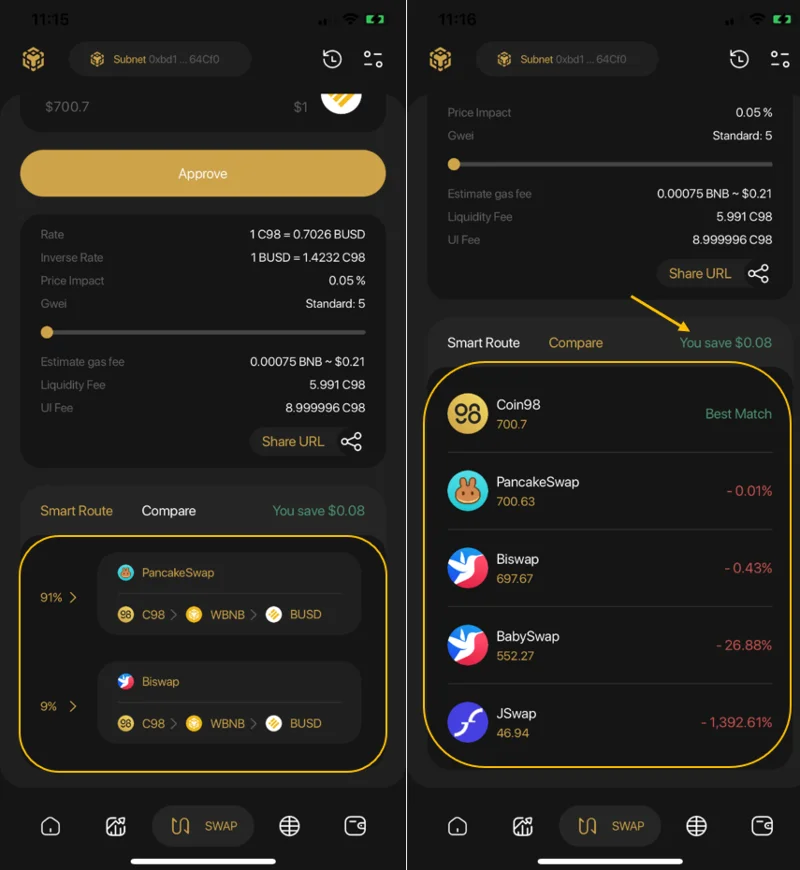
Come fare trading con Coin98 Exchange 2.0 sulla Coin98 Super App
Passaggio 1: nell'interfaccia principale dell'app Coin98 Super, fai clic su Scambia.
Passaggio 2: seleziona la blockchain. In questo articolo, sceglierò BNB Chain come esempio.
Passaggio 3: fai clic sull'icona delle impostazioni nell'angolo in alto a destra dello schermo e scegli tra 2 opzioni di interfaccia: l'interfaccia utente di base e l'interfaccia utente pro.
Gli utenti possono anche regolare la tariffa del gas e lo slittamento in questa sezione.
La freccia al centro dell'interfaccia di trading viene utilizzata per passare dalla posizione di acquisto a quella di vendita. Gli utenti devono controllare attentamente le posizioni dei token prima di effettuare qualsiasi transazione.
Gli utenti devono compilare le seguenti informazioni per completare la transazione:
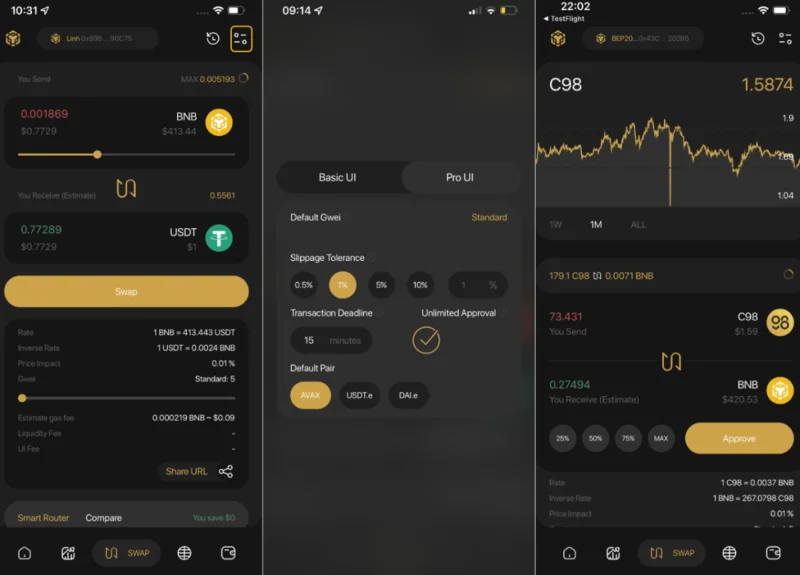
Passaggio 4: fai scorrere la barra per regolare l'importo del trading. Leggi attentamente le informazioni seguenti prima di decidere di fare trading:
Passaggio 5: fare clic su Approva (per la prima volta) → Scambia per finire.
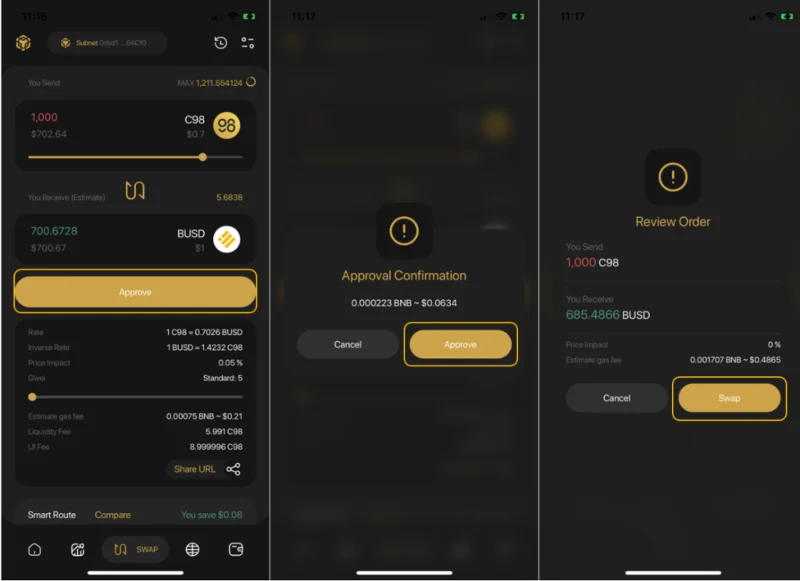
Dopo lo scambio con successo, gli utenti possono accedere alla cronologia degli scambi dall'interfaccia di scambio per visualizzare le proprie transazioni o tornare alla schermata iniziale per controllare i token scambiati, se necessario.
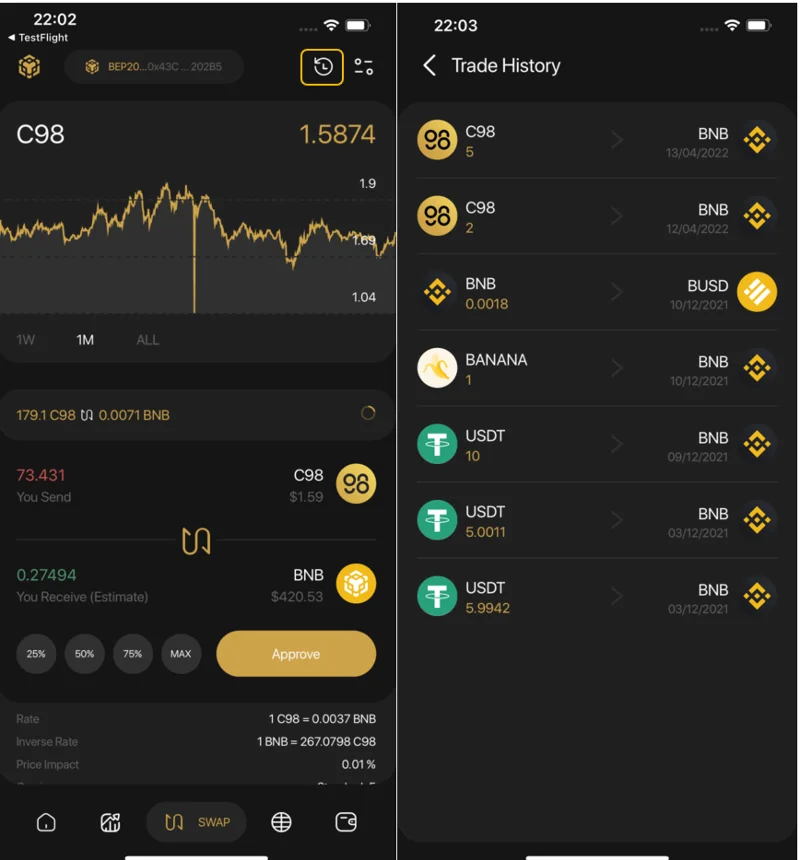
Nota:
Come fare trading su Coin98 Exchange
Coin98 Exchange is always striving to integrate as many leading AMMs in the market as possible, including Uniswap & SushiSwap (Ethereum), PancakeSwap (V2) & MDEX (Binance Smart Chain), MDEX (HECO Chain), Pangolin & Trader Joe (Avalanche C-chain), QuickSwap (Polygon), Coin98 Exchange (Solana) and more… allowing users to have a seamless transaction experience, across different blockchains with a single multi-chain wallet and without changing the network.
First, you can access Coin98 Exchange here: exchange.coin98.com
Overview of the Coin98 Exchange interface
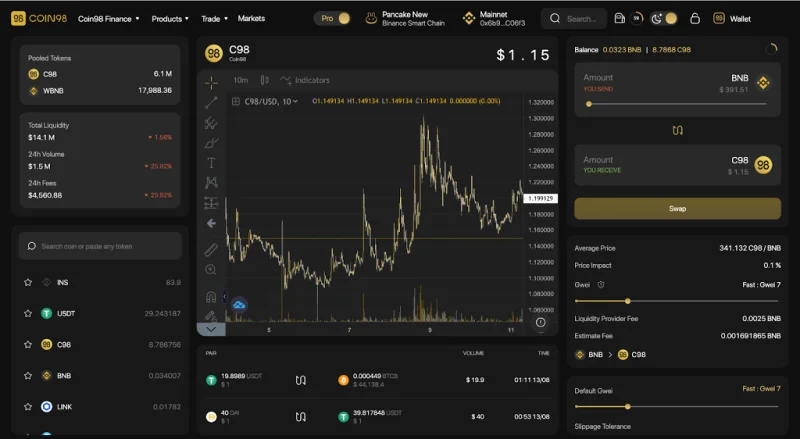
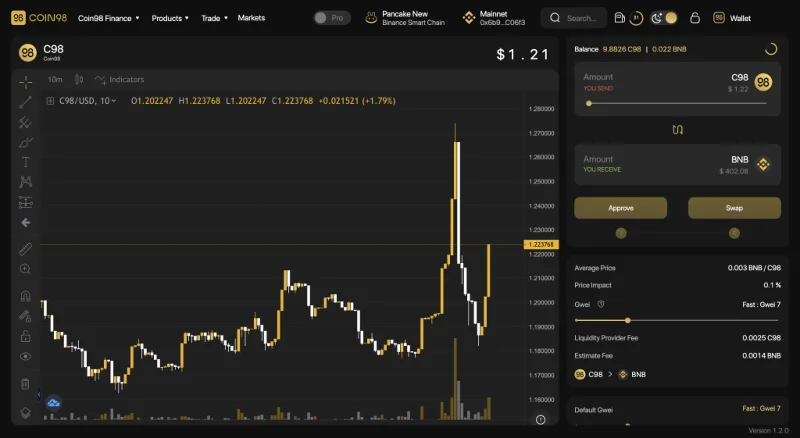
Coin98 offers users 2 types of interface:
The Pro-UI with in-depth trading information and features for active traders and more advanced users
The Basic - UI with a streamlined interface that focuses on simplicity, speed, and ease-of-use, making Coin98 Exchange a perfect choice for crypto novices, first-time users, and users who just need the basics.
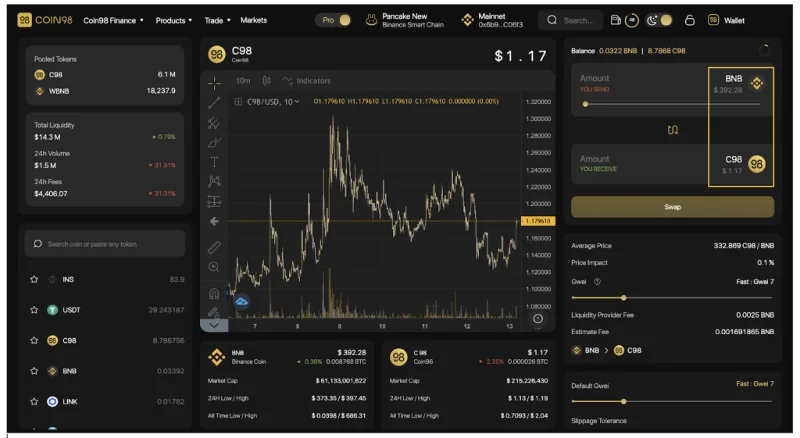
The main interface of Coin98 Exchange has the following sections:
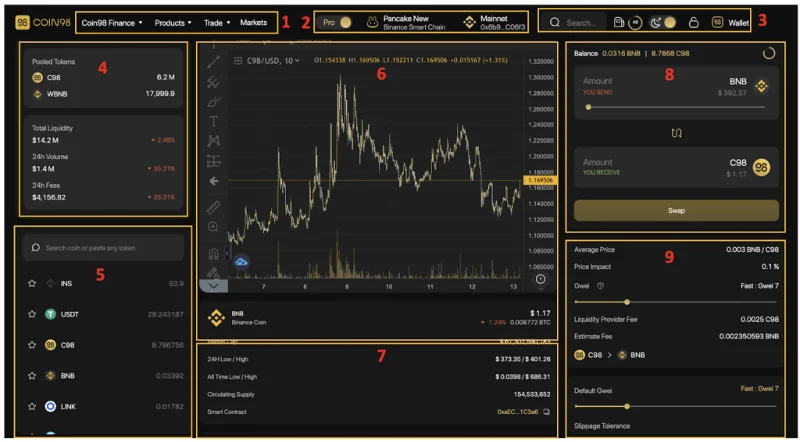
[1] Navigation to other Coin98's sites, products and AMMs of Coin98 Exchange.
[2] From left to right:
[3] Some built-in utilities:
[4] Information about the 2 chosen tokens in the pool:
[5] The Token selection area.
[6] The price chart of the token that you intend to swap including:
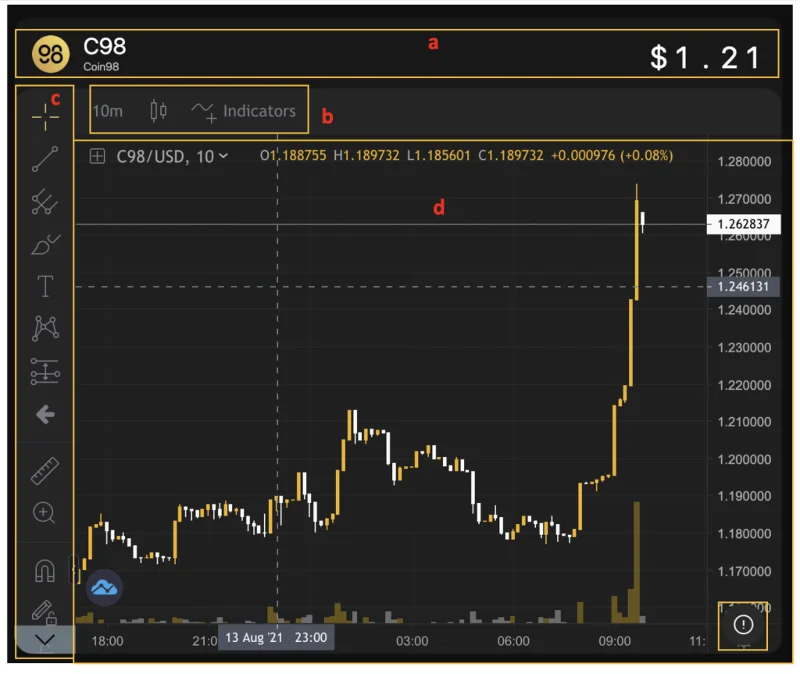
Users can click the (!) icon at the lower-left corner of the price chart to view more information about the token.
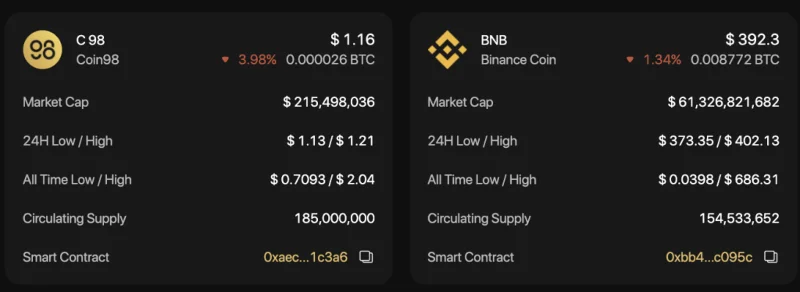
[7] History of transactions.
[8] The transaction area.
[9] The transaction information as well as the main settings:
Advanced Settings:
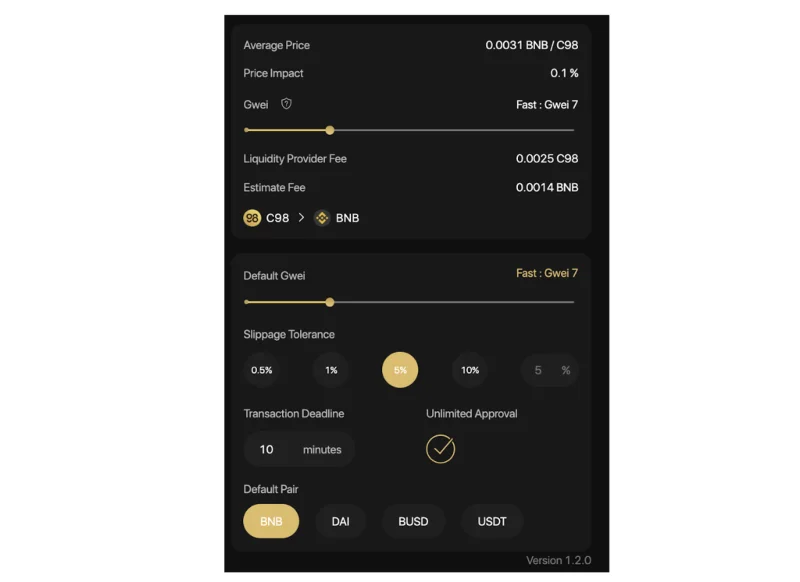
A simple guide on how to trade on Coin98 Exchange
Step 1: Select the AMM you want to trade with by clicking on one of the two highlighted sections on the screen.
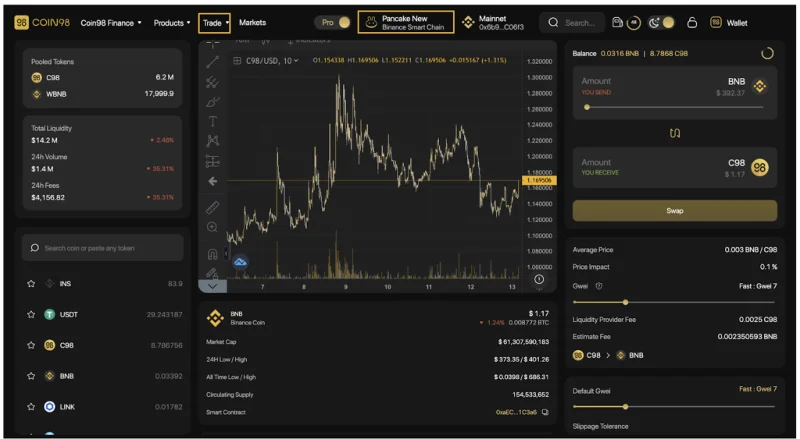
In this case, I will take PancakeSwap (V2) as an example.
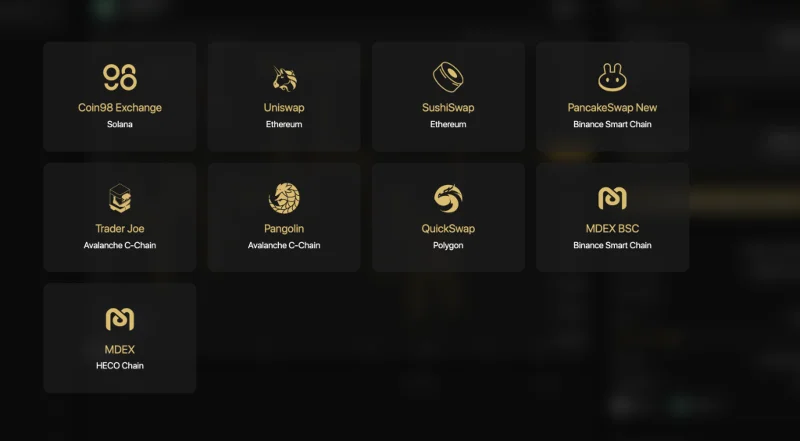
Step 2: Select the token you want to trade from the token search bar.
For new tokens that have not been listed on Coin98 Exchange, you can paste their Contract addresses and trade as usual.
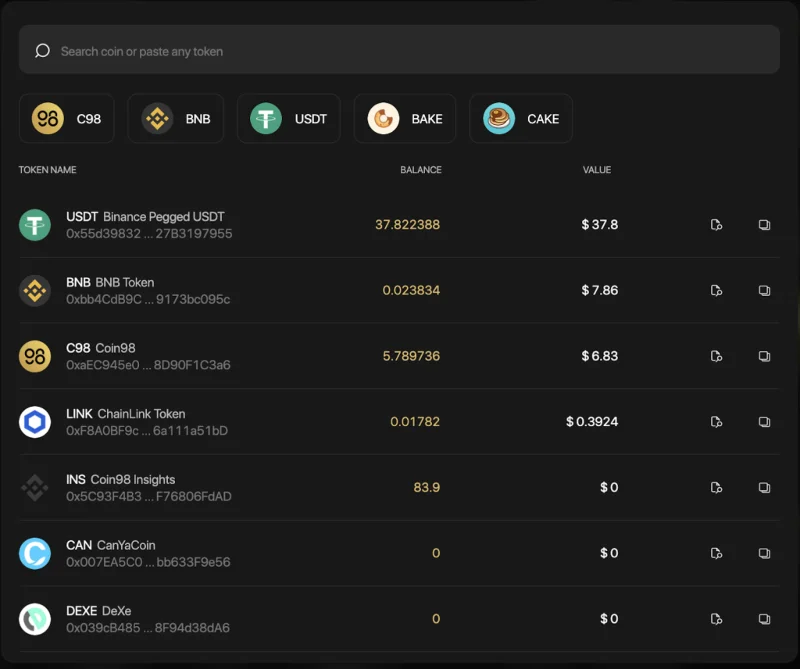
I will take the USDT-C98 trading pair as an example.
Step 3: At the transaction area, you can:
Step 4: Click Confirm to confirm that you agree with the fee and are ready to make this transaction.
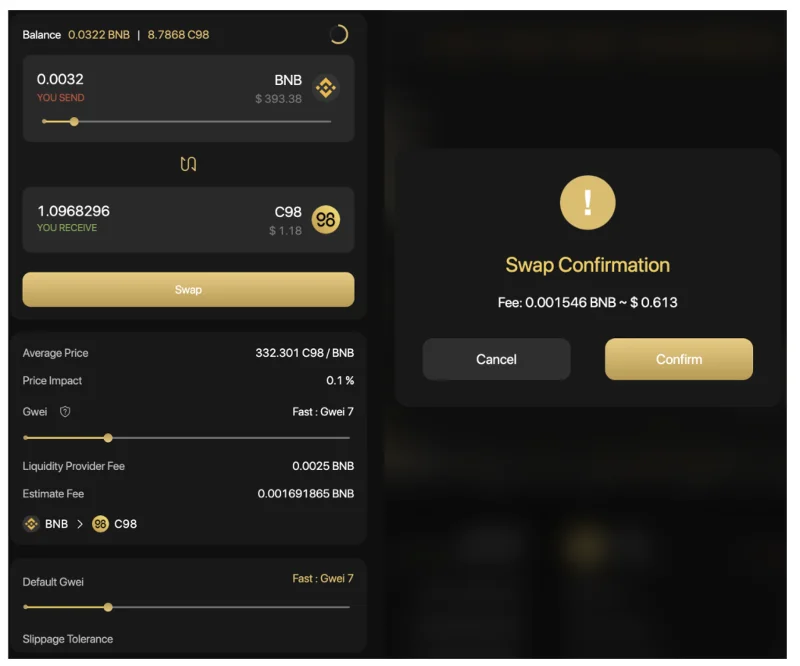
When the transaction is completed, you will receive a notification at the bottom right corner of the screen.
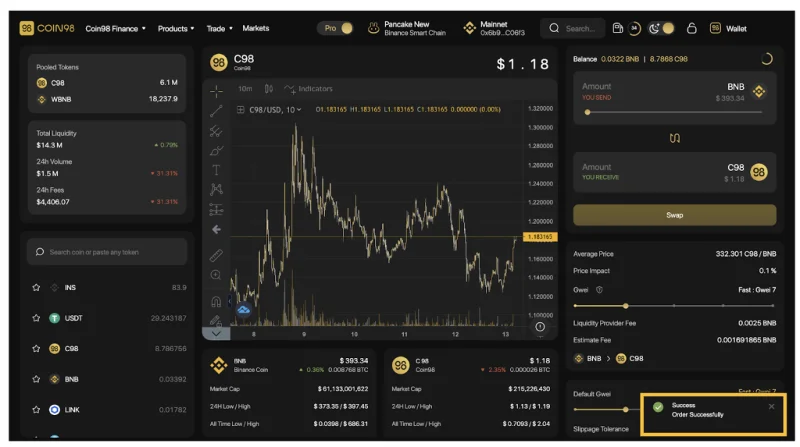
Note:
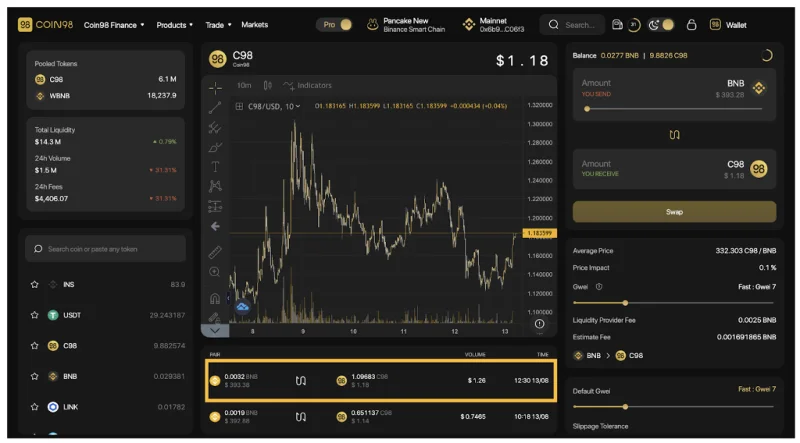
In the future, Coin98 Exchange will integrate more top-tier AMMs and cross-chain bridges to elevate users' trading experience to a new level.
During the Swap process, if you want to learn more about a certain coin/token, you can use the Coin98 Markets feature right in your browser.
How to use Coin98 Markets
Coin98 Markets is a tool that aggregates real-time, detailed, and useful market data that assists users in monitoring the market changes and fluctuations, from which appropriate investment decisions can be made.
Coin98 Markets is now tracking over 9,600 coins/tokens and over 660 exchanges. Via Coin98 Markets, users can gain understanding and objective perspectives of a coin/token to make appropriate investment and trading decisions.
Overview of the Coin98 Markets interface
Similar to the trading interface on Coin98 Exchange, before going into the detailed instructions, I will introduce to you the metrics as well as the main interface of Coin98 Markets.
From the Coin98 Exchange interface, you can click Markets on the navigation bar at the top of the page, or access Coin98 Markets via: markets.coin98.com.
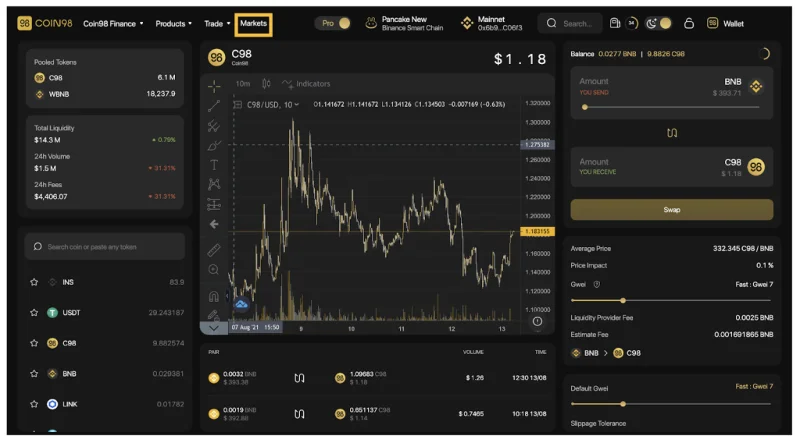
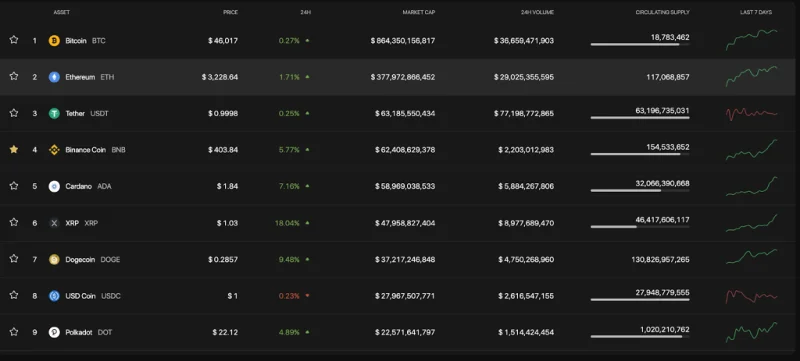
The main interface of Coin98 Markets has the following sections:
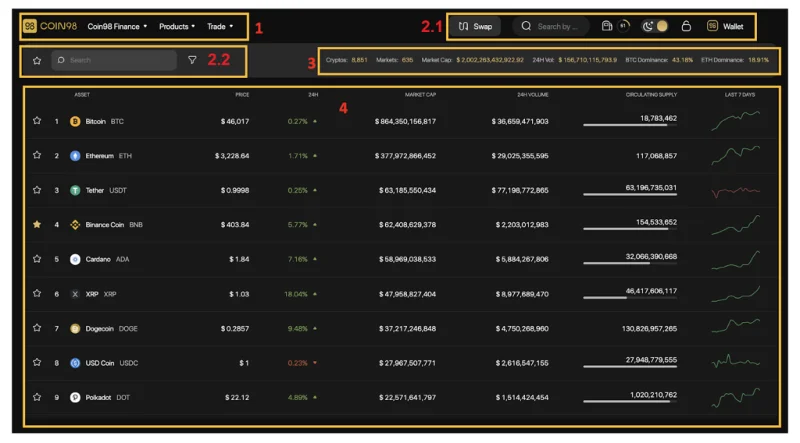
[1] Navigation to other Coin98's sites, products and AMMs of Coin98 Exchange.
[2] Some built-in utilities:

[3] Market Fundamental metrics:

[4] Basic information about Coins/Tokens:
How to view token/coin information on Coin98 Markets
Step 1: Search token/coin you want to view on Coin98 Markets.
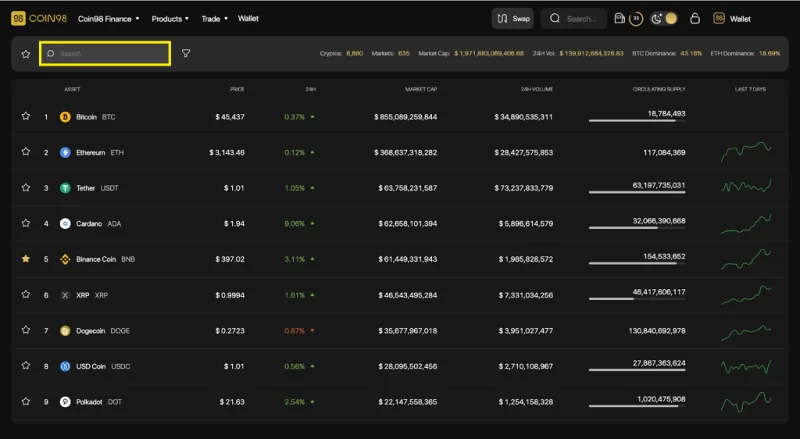
Step 2: Click on the token/coin you want to learn about.
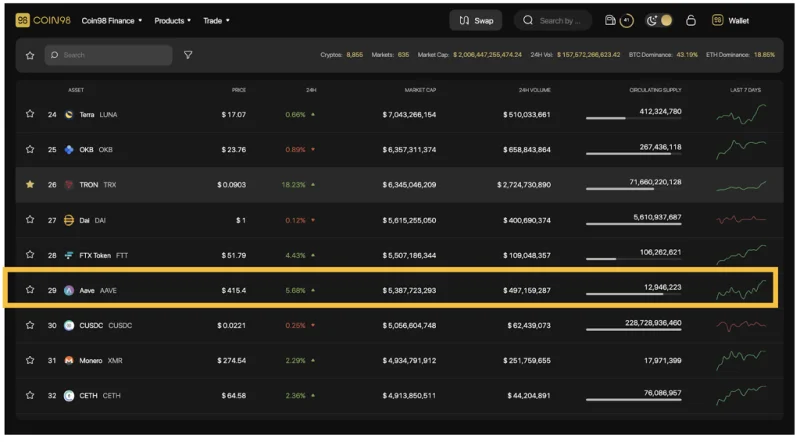
Step 3: The system will display the full information about the coin/token you have selected with some details as follows:
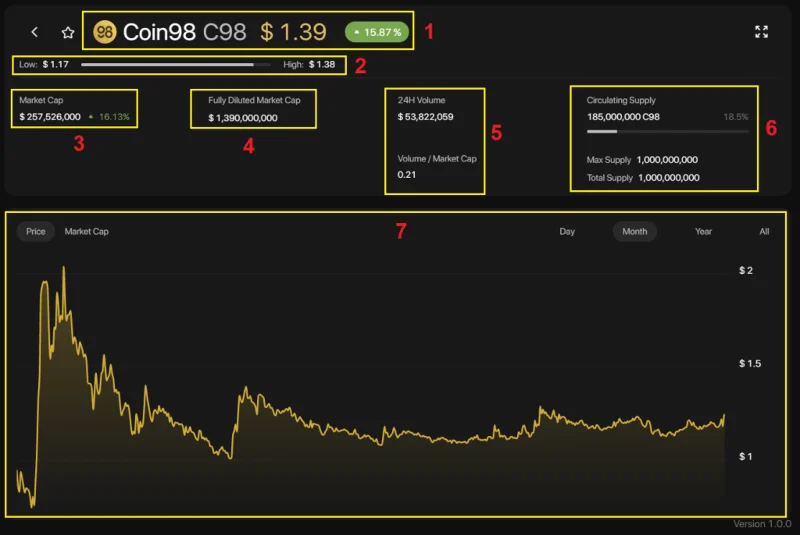
[1] Name and ticker of the token/coin, current price and % of price change within 24 hours
[2] Low - High bar: The highest and lowest price within 24 hours of the chosen coin/token.
[3] Market Cap and % change of Market Cap within 24 hours
[4] Fully Diluted Market Cap: Total market capitalization when all tokens are unlocked.
[5] With 2 information about Volume:
[6] Supply metrics:
[7] The price chart and the capitalization value of the chosen token/coin by day (Day), month (Month), Year (Year), and the entire time (All) view.
In addition, users can also use the Expand View mode by clicking on the arrow icon on the top right of the screen.
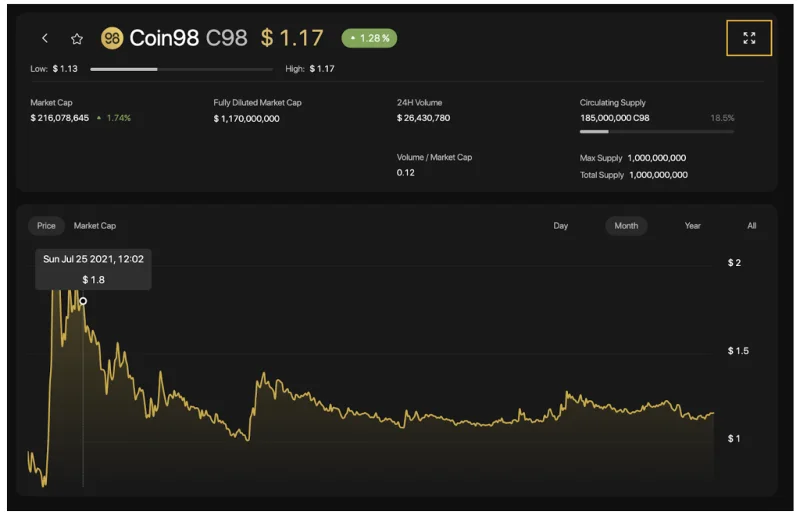
In this interface, you can see other information such as:
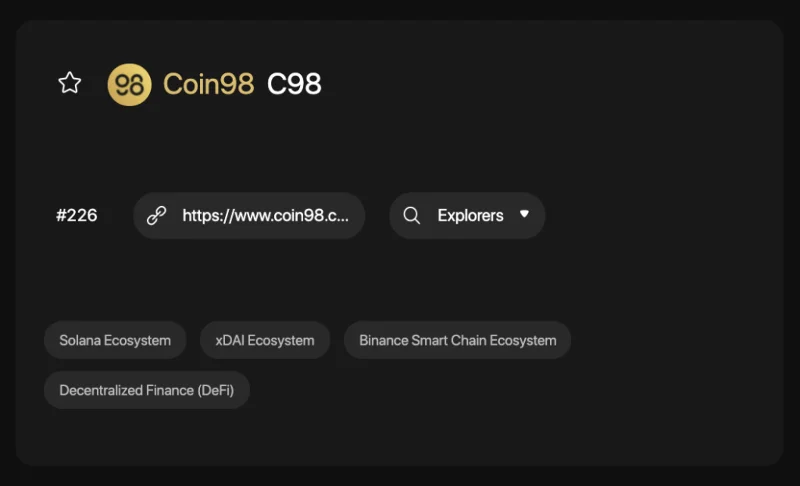
After researching the tokens/coins and trading them successfully you can directly manage your asset portfolio right on Coin98 Portfolio.
How to use Coin98 Portfolio
Coin98 Portfolio - a one-stop tracker for all your coins, has supported tracking portfolio for the following top-tier blockchain addresses: Solana, Ethereum, BSC, HECO, Avalanche C-Chain, Tron, TomoChain, Near, Polkadot, Kusama, and Celo, ... easily and conveniently. You only need to insert the wallet addresses to track without the need for Passphrases and Private Keys
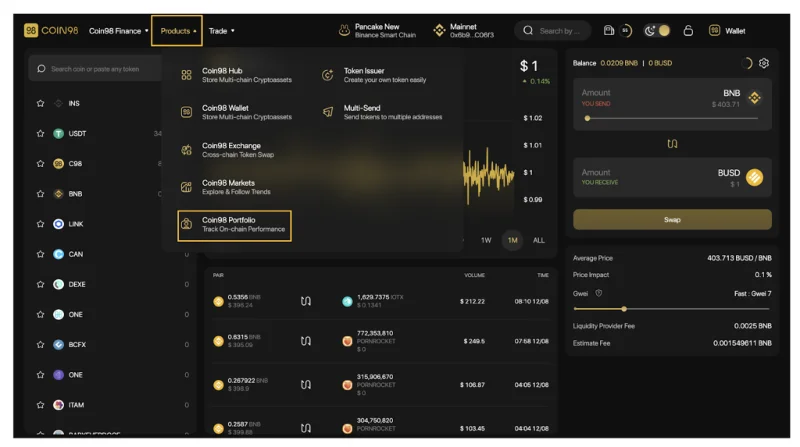
To use Coin98 Portfolio, from the Coin98 Exchange/ Coin98 Markets interface, you can click on the Products navigation bar at the top of the page, select Coin98 Portfolio or visit this link: portfolio.coin98. com
The main interface of Coin98 Portfolio has the following sections.
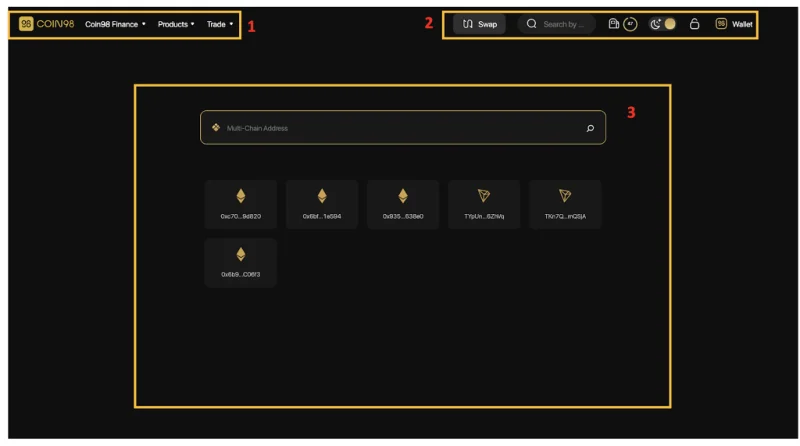
[1] Navigation to other Coin98's sites, products and AMMs of Coin98 Exchange.

[2]: Some built-in utilities:
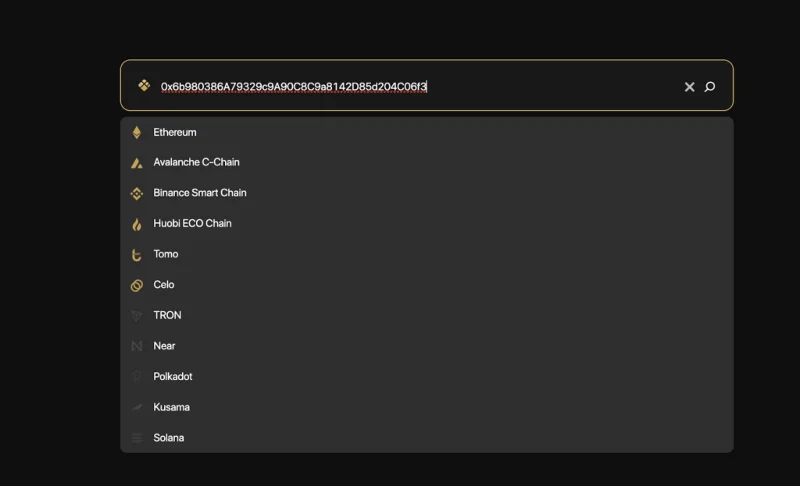
[3] The Search box: This is the main feature of Coin98 Portfolio. You only need to insert the wallet addresses you want to track, no need for Passphrases and Private Keys. Coin98 Portfolio also supports saving recent addresses to make it easier for users to manage their assets.
Here are two simple steps you need to follow to use Coin98 Portfolio:
After you have inserted all of your wallets, here is what your portfolio looks like.
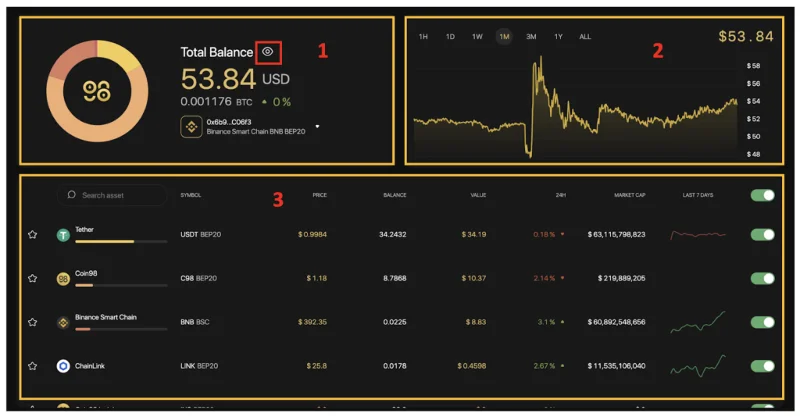
The main information includes:
[1] The total balance:
[2] The Balance chart: You can choose any time frame, from 1 hour - 1 year or the whole time.
[3] The Assets portfolio: Full information about each token you are holding such as price, total value, value changed in 24 hours, volume,.... To hide/show any token you can use the on/off icon on the right.
Moreover, you can click on a token to see its basic information popped up on the right side of the screen.
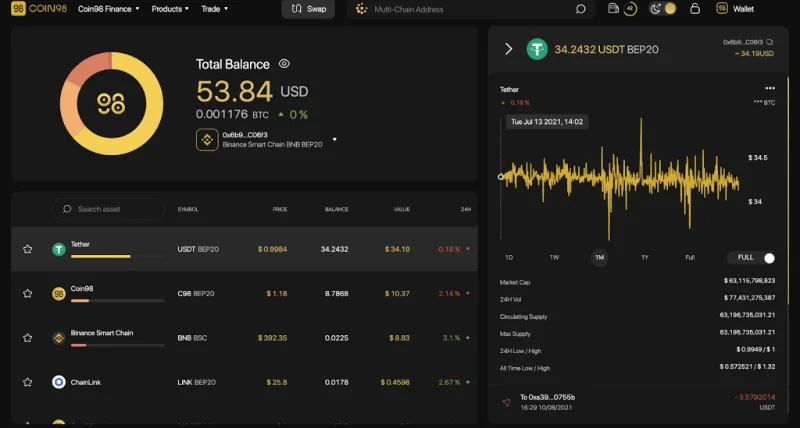
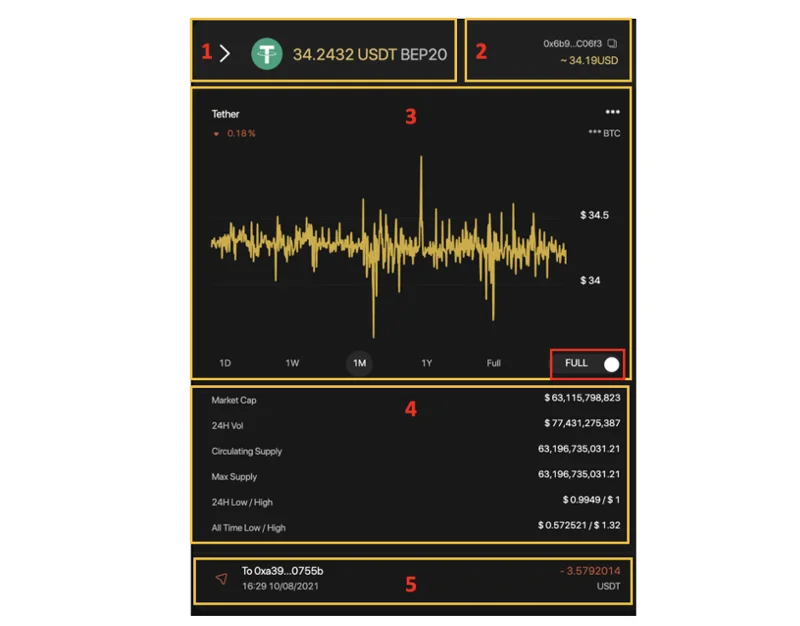
The main information includes:
[1] The token sticker, the standard and the token amount.
[2] Token wallet address, value in USD.
[3] The graph showing the total value of a token or the price of a token unit over time. To change the chart you can use the toggle button in the right corner of the chart. You can choose multiple time frames, from 1 hour - 1 year or the whole time.
[4] Token Information overview.
[5] Token transaction history on the wallet address you are choosing. You can click on each transaction to check the information on Explorer tools such as BscScan, EtherScan, ....
Besides the three main features mentioned above, Coin98 Exchange also offers an additional set of utility tools called Coin98 Terminal.
How to use Coin98 Terminals
Coin98 Terminal (Utilities) is a set of utility tools to enable users to easily become a part of the DeFi world in a convenient way, including Token Issuer, Multi-send, and Multisig (coming soon).
Token Issuer
Token Issuer is a feature that allows users to issue their own tokens easily and conveniently. Currently, Token Issuer is supporting on 3 main chains: Ethereum, HECO, and Binance Smart Chain. In the near future users can also experience this tool Tron (TRC10) and Solana.
To issue a new token on Token Issuer, follow those steps:
On the Products navigation bar at the top of the page, select Coin98 Issuer or visit the link: terminals.coin98.com/issuer
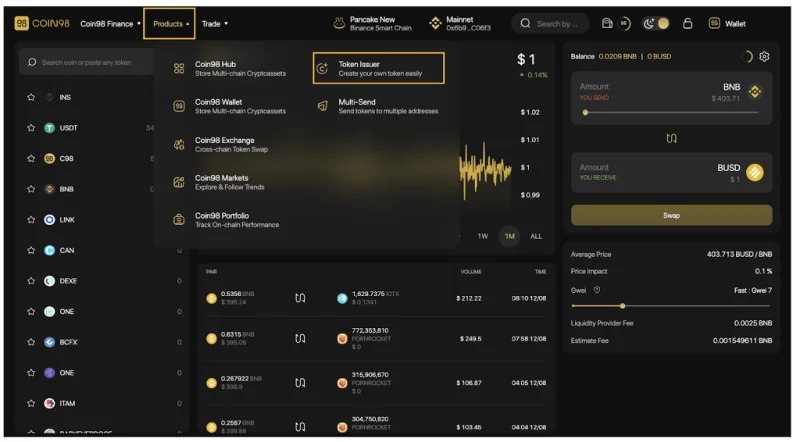
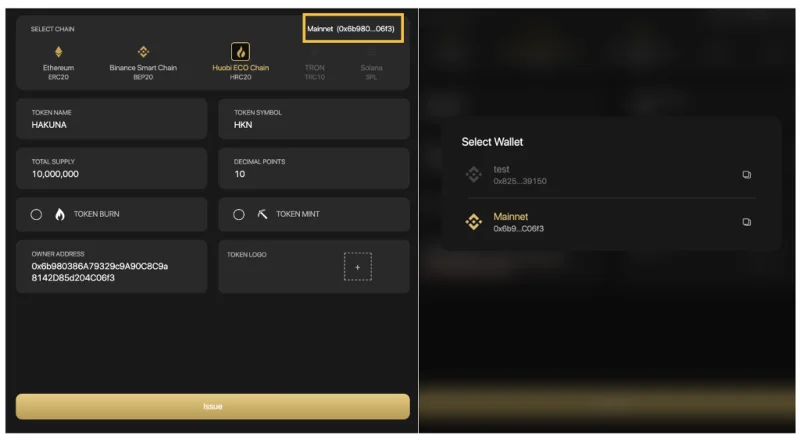
Step 1: Select the network that you wish to issue tokens, in this example I chose the HECO Chain (HRC20). The system would find your respective chain wallet.
Step 2: Fill in the following information:
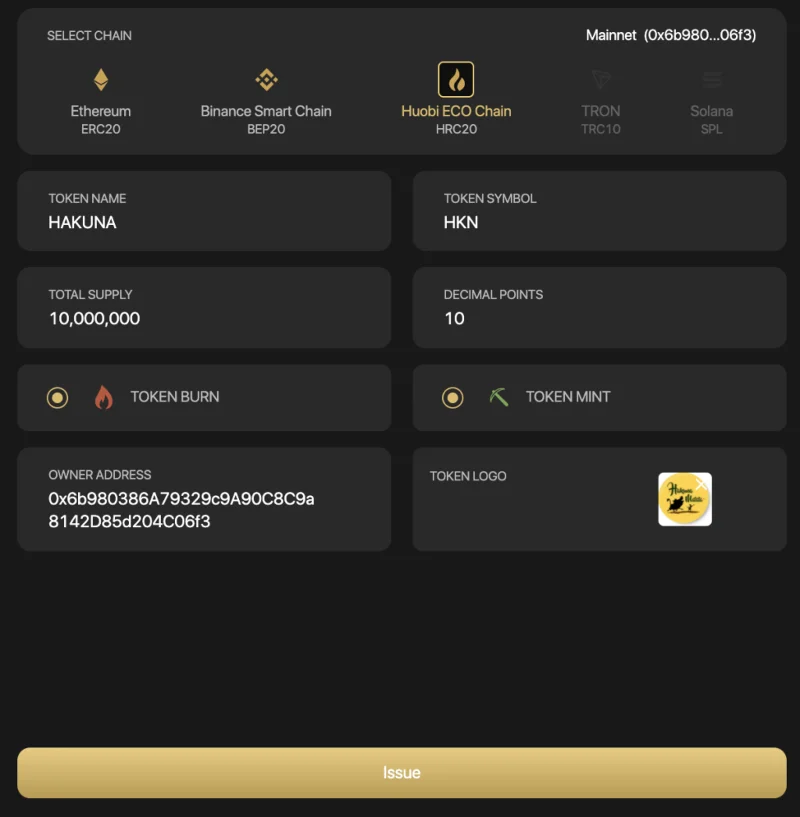
You can consider two options after issuing the token:
To change the address of your connected wallet, you can do the following steps:
Step 3: Click Issue.
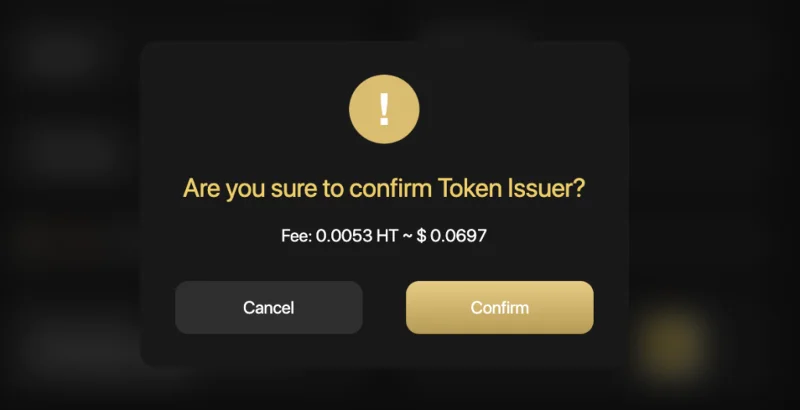
Step 4: The system will ask users to pay a network fee to issue tokens.
Users need to prepare enough fees for this step. If you agree, click Confirm on the pop-up confirmation.
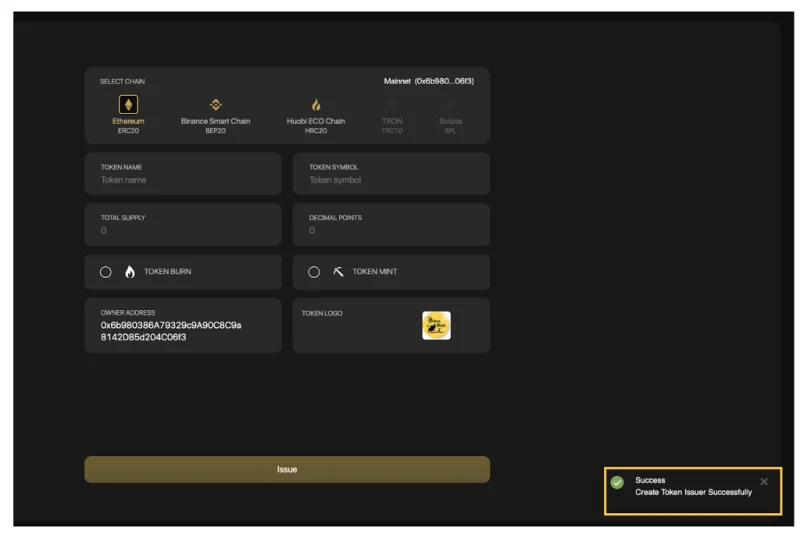
There will be a pop-up announcement in the bottom right corner to redirect you to EtherScan/BscScan/Hecoscan to view your token information.
Multi-sender
Multi-sender is a feature allowing users to send coins/tokens to multiple addresses at the same time, on the following blockchains: Binance Smart Chain, Solana, Ethereum, Polygon, HECO Chain, Klaytn, GateChain, Celo, OKExChain, Tomochain, xDAI, Avalanche (C-chain), Fantom.
To access Coin98 Multisend, click on the Products navigation bar at the top of the page, select Coin98 Multisend or visit the link: terminals.coin98.com/multisend
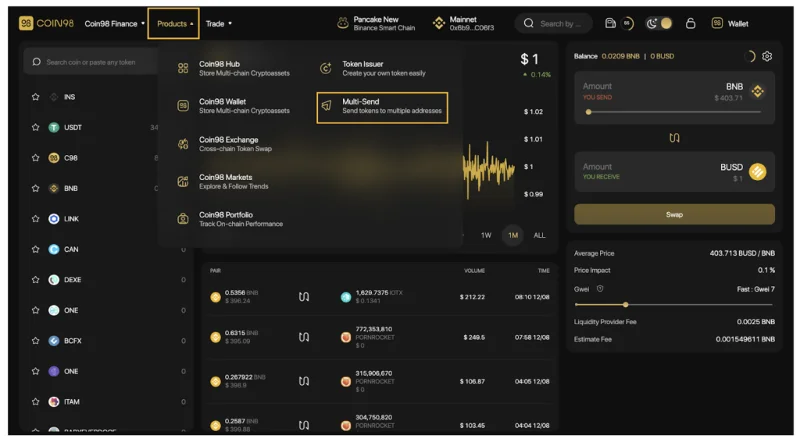
The main interface of Coin98 Multisend has the following sections:
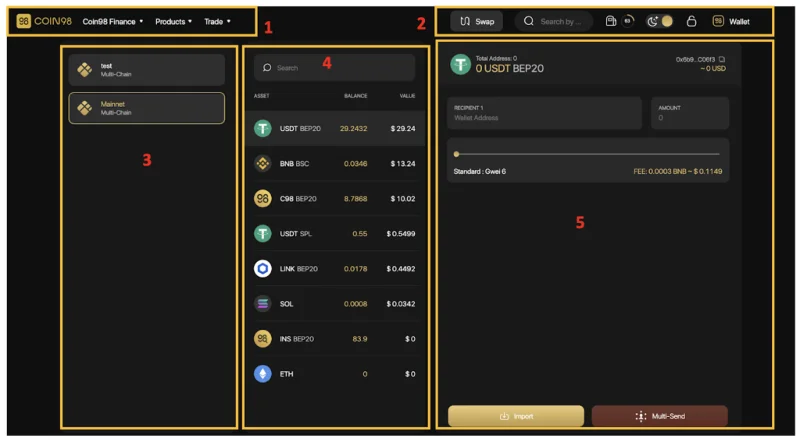
To experience the Multi-send feature, you can follow these steps:
[1] Navigation to other Coin98's sites, products and AMMs of Coin98 Exchange.
[2] Some built-in utilities:

[3] The wallet selection area.
[4] The token selection area.
[5] The main area to send tokens.
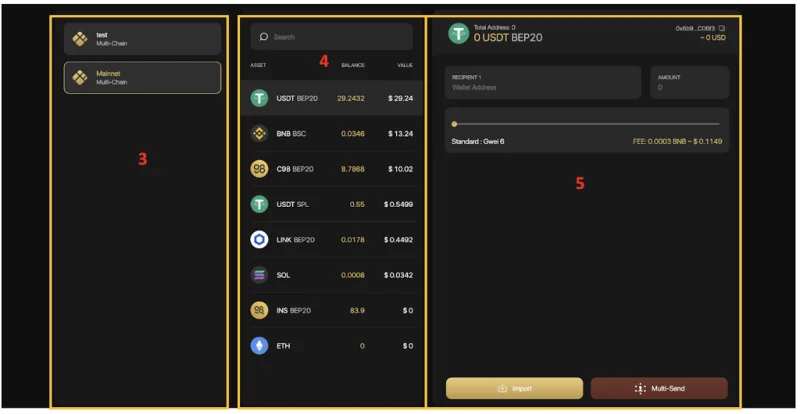
In the area where you can send tokens, follow those steps:
Step 1: Enter the recipient's wallet addresses. There are 2 ways to do it:
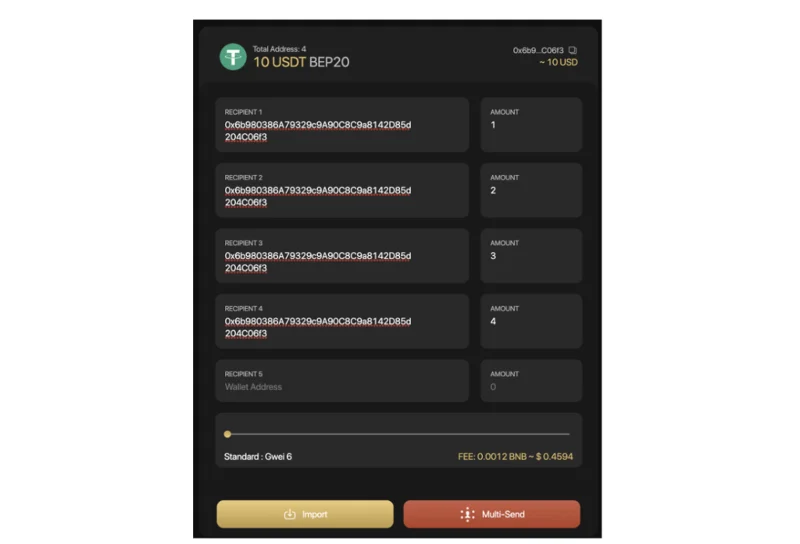
Eg: 0xbe80ceed72e1798c631fcd92f611367abd7f836f?0.5, 0x52c12e10f181f801324ed3c3cd6d17f58a93e6b8?1, 0x5a7b52cf2f59d072aa38dee1107612ad656e048e?0.75
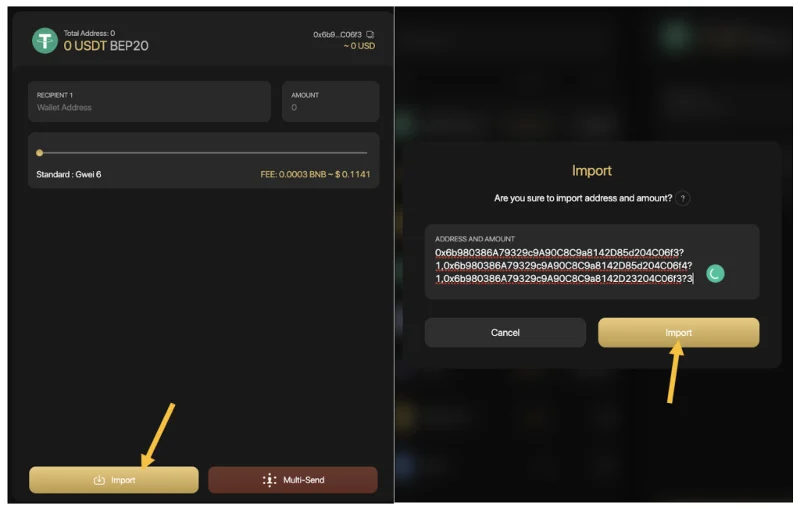
Step 2: Slide the gas bar to reach the desired gwei → Click Send to complete.
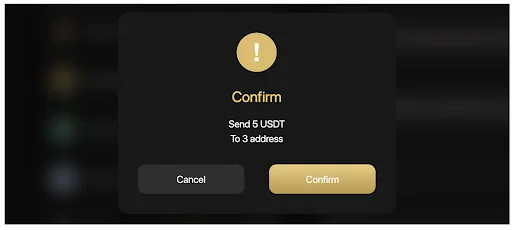
If you agree with the sending information, click Confirm.
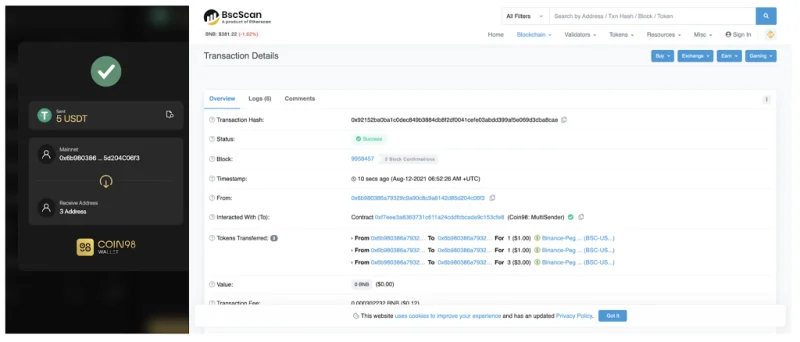
After sending successfully, you can access the Token History on Coin98 Extension Wallet or Coin98 Portfolio to view your transactions.To view further information of the transactions, you can also check on Explorer browsers (Etherscan, BscScan, ...).
Note:
Wallet Approval
Wallet Approval is a feature allowing you to inspect all the contracts you've approved to spend money on your behalf and revoke their access for the ones you no longer need.
Why should you use Wallet Approval tool?
In order to trade, farm, stake, or interact with any dApps, users are required to allow smart contracts to access your assets. There are 2 approaches to allowance: Allow for a specific amount of tokens and unlimited approval.
Unlimited approval brings them a fast and frictionless experience; however, it might potentially affect the risk of asset loss if users interact with untrustworthy platforms or scamming pools.
It is recommended not to grant unlimited access to a platform to keep your funds safe.
How to revoke token allowances
Step 1: Access Coin98 Terminal
Step 2: Select Wallet Approval on the main screen to start revoking token.
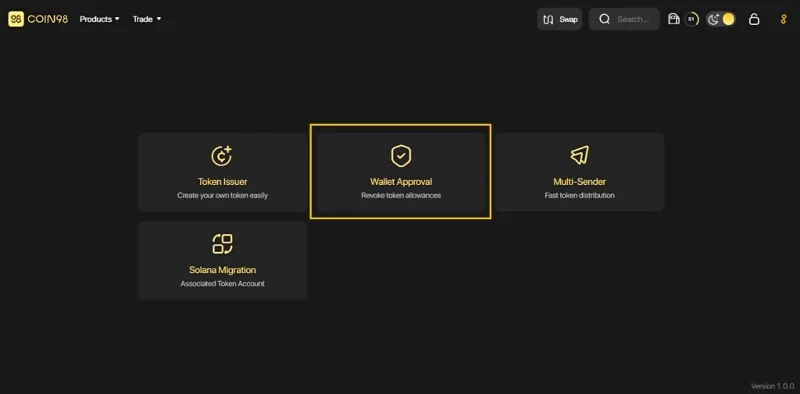
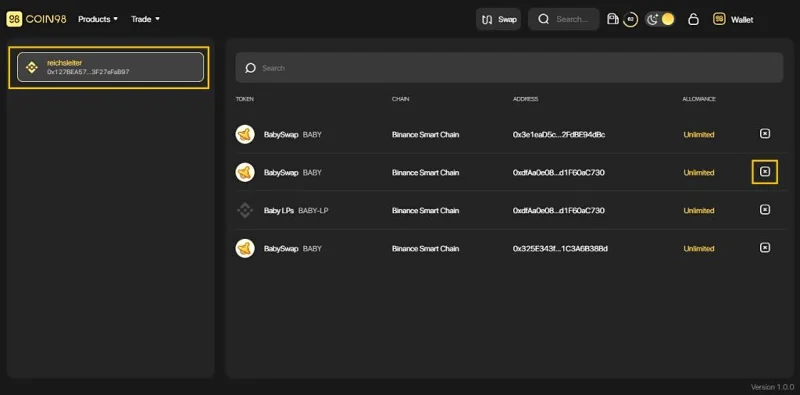
Step 3: Click to a wallet you often interact with DeFi services.
Step 4: In this interface, you can revoke the permission of any desired contract by clicking on the [x] icon.
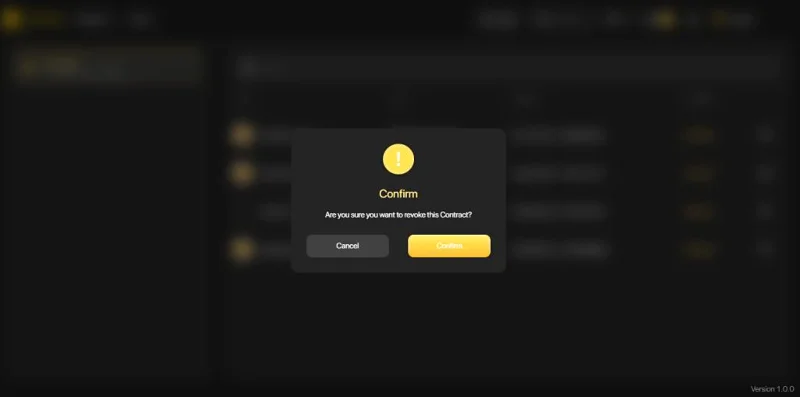
Step 5: Click Confirm for completion and wait for seconds. All done!
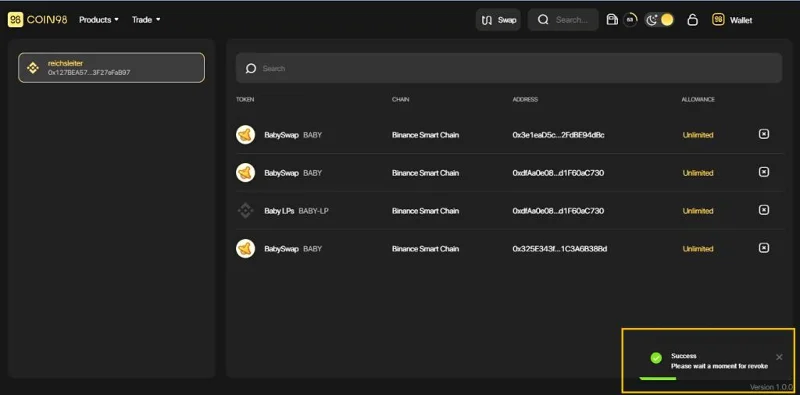
Once completed, the system will display a message in the lower right corner of the screen.
Note:
Solana Migration
Unlike other Blockchains, SOL addresses and SPL addresses are totally different, making it hard for users to utilize. If users send SPL tokens to SOL addresses, the network will automatically initiate another SPL address instead of navigating to the existing Wallet. That is the main reason why assets are divided into many single SPL addresses.
Solana Wallet Migration is a solution that helps users to migrate their associated SPL tokens to a single SOL wallet address and prevent the fragmentation of users’ assets when interacting with Solana DApps.
How to migrate fragmented SPL tokens to an SPL wallet
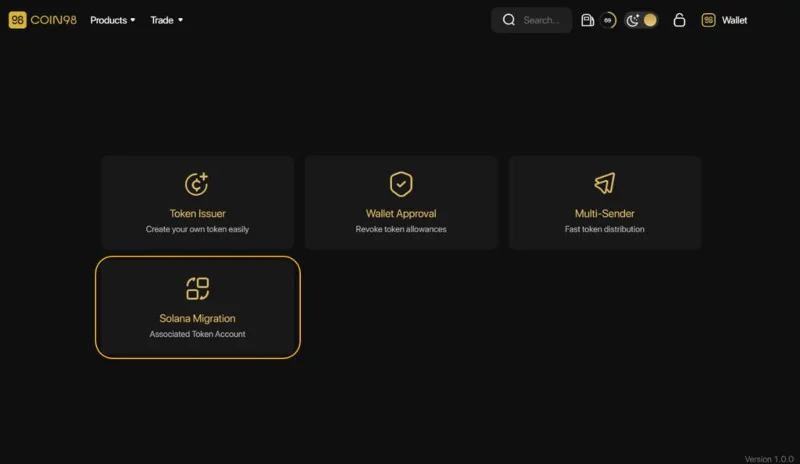
Step 1: Access Coin98 Terminal.
Step 2: On the home screen, choose Solana Migration to start the migration process.
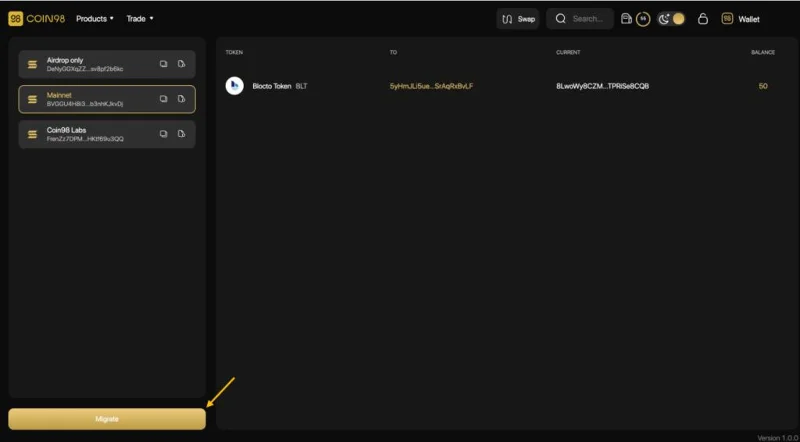
Step 3: At this screen, you can check:
Click the Migrate button to start the process
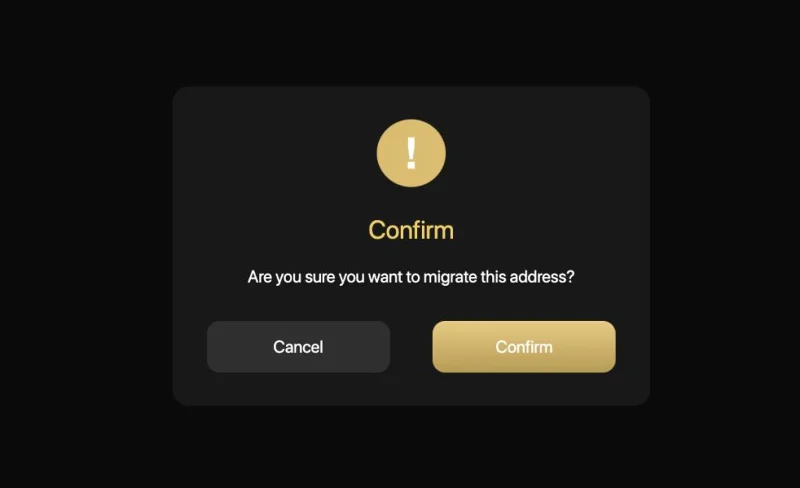
Then choose Confirm and wait for seconds to complete the process.
Notes:
Upcoming features on Coin98 Exchange
Besides the outstanding features that I introduced above, in the future, the Coin98 Exchange universe will also launch the following features:
Stay tuned for the guides on how to use these features in the next articles.
Final Thought
Through this article, I hope that you have gained an overview of the basic steps to trade on Coin98 Exchange. I believe the features integrated on this All-in-one platform will bring users optimized speed at the lowest cost possible.
If you have any questions or get into trouble using Coin98 Exchange, please feel free to comment below and join Coin98 Community to discuss your problem with admins!
Solana’s 2026 ecosystem is expanding across DeFi, stablecoins, RWAs, and payments. Here’s what could sustain—or weaken—its Q4 momentum.
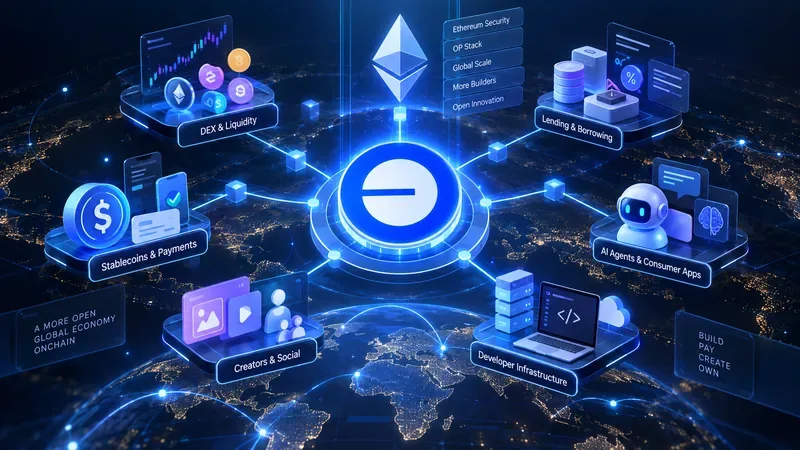
Una guida al 2026 per Optimism Superchain: metriche di adozione verificate, compromessi dell'OP Stack e come Uniswap, Aerodrome, Velodrome, Aave e Morpho si adattano a esigenze diverse.
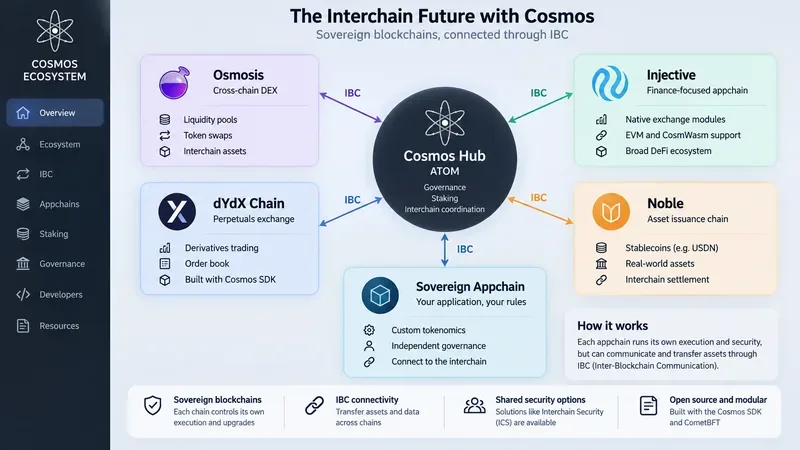
Comprendere come Cosmos, ATOM, IBC e le appchains si integrano tra loro, oltre a come valutare Osmosis, dYdX Chain, Injective, Noble e il modello interchain.
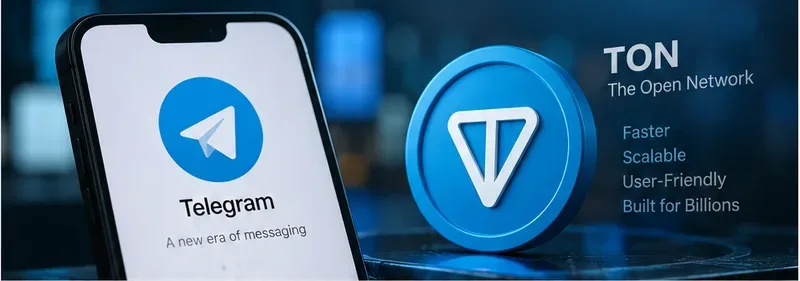
Esplora l'ecosistema TON, le mini-app di Telegram, i wallet, i pagamenti, la DeFi e i rischi, oltre al cambio di nome da Toncoin a Gram previsto per il 2026 e al suo significato.
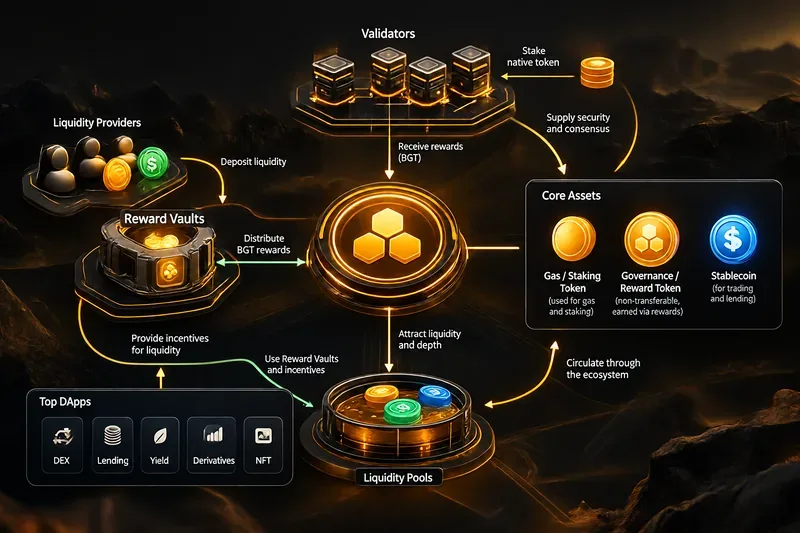
Scopri il modello Proof of Liquidity di Berachain, BERA, BGT, HONEY, i Reward Vault e importanti DApp come BEX, Bend, Infrared, Kodiak, Dolomite e BeraBorrow.
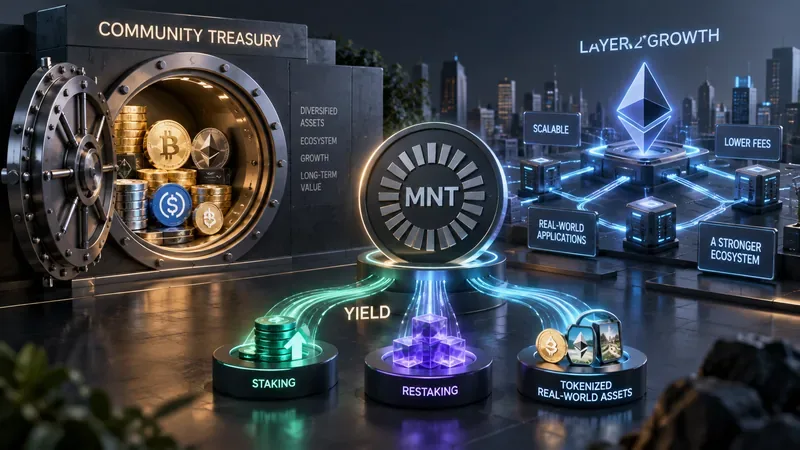
Comprendere l'ecosistema di Mantle basato su MNT, la struttura della tesoreria, i livelli di rendimento, l'architettura L2, i segnali di crescita e i rischi che gli investitori dovrebbero monitorare nel 2026.
Una valutazione pratica, aggiornata al 2026, dell'EVM parallelo di Monad, della sua diffusione nell'ecosistema, dei compromessi per gli sviluppatori e del suo confronto con Ethereum, Sei e MegaETH.
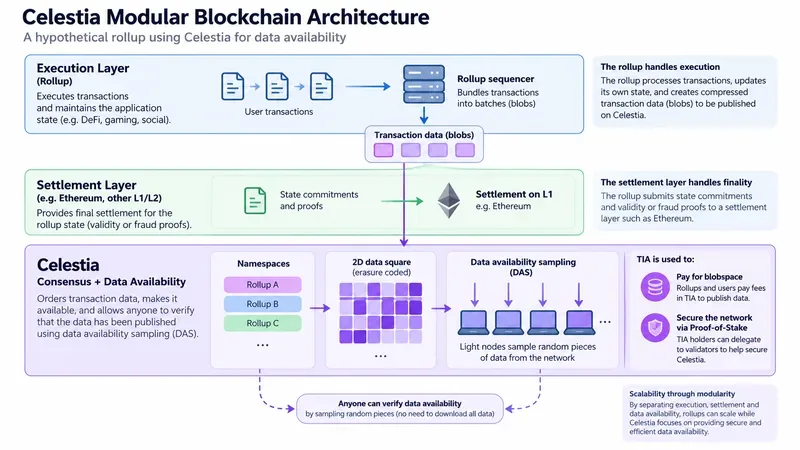
Un'analisi approfondita e pratica di Celestia che illustra le blockchain modulari, il campionamento della disponibilità dei dati, i namespace, Blobstream, l'utilità TIA e i compromessi che le aggregazioni comportano.
Esplora l'ecosistema Base nel 2026, da Aerodrome e Morpho ad Aave, Uniswap, Virtuals, Zora, Moonwell e i pagamenti degli agenti x402.
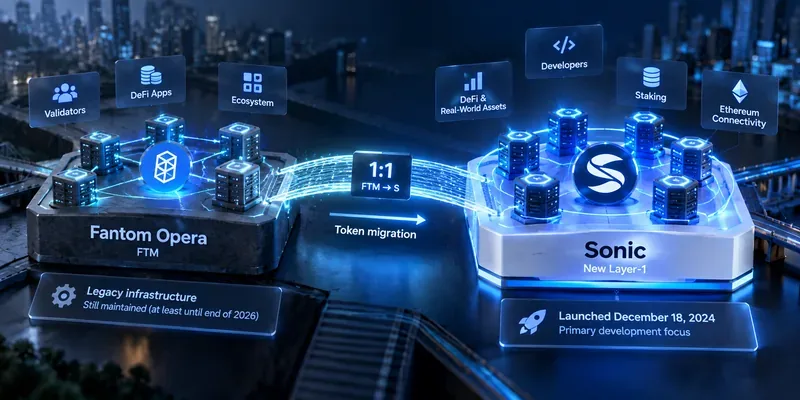
Analizza la transizione di Fantom a Sonic, la migrazione da FTM a S, l'architettura di Sonic, la tokenomics, gli incentivi per gli sviluppatori, l'impatto sull'ecosistema e i rischi che saranno ancora rilevanti nel 2026.