Was ist Coin98 Exchange 2.0? Ein AZ-Leitfaden zur Verwendung von Coin98 Exchange mit 4 Hauptfunktionen: Exchange, Markets, Portfolio & Terminal.
Coin98 Exchange 2.0 ist das Produkt der nächsten Generation von Coin98 Labs in unseren kontinuierlichen Bemühungen, die Mission zu erfüllen, die Benutzererfahrung zu optimieren und die Massenakzeptanz von DeFi voranzutreiben.
In diesem Artikel werde ich Ihnen einen Überblick über Coin98 Exchange 2.0 sowie einen Leitfaden von A bis Z geben, wie Sie diese hochmoderne Multichain-Liquiditätsaggregator-Plattform erleben können!
Was ist Coin98 Exchange 2.0?
Coin98 Exchange 2.0 ist eine dezentrale Börse (DEX), ein Multi-Chain-Liquiditätsaggregator. Neben der Beibehaltung der erweiterten Funktionen früherer Versionen fügt Coin98 Exchange 2.0 einen Super-Link-Mechanismus hinzu, um die Liquidität zu aggregieren, wodurch der kürzeste Weg und der beste Preis für Benutzer in nur einer Transaktion gefunden werden.
Coin98 Exchange 2.0 wurde entwickelt, um das Problem der Liquiditätsfragmentierung auf vielen Blockchains zu lösen und den Benutzern zu helfen, DeFi vollständig und nahtlos zu erleben, ohne dass tiefgreifende Kenntnisse der Blockchain-Technologie erforderlich sind.
Coin98 Exchange 2.0 ist als dezentrale, nicht verwahrte Version der führenden CEXs auf dem Markt bekannt und bringt nach und nach wesentliche Dienste in der traditionellen Wirtschaft zu DeFi, wie zum Beispiel:
- Handel mit Exchange ;
- Marktdaten-Aggregator-Tool mit Markets ;
- Vermögensverwaltungstool mit Portfolio ;
- Utility-Toolkit für DeFi-Benutzer mit Terminals ;
- Und einige kommende Funktionen wie Staking, Cross-Chain-Swap, Multi-Sig, ...
Besonderheiten von Coin98 Exchange 2.0
Integrieren Sie die besten Liquiditätsquellen des Marktes.
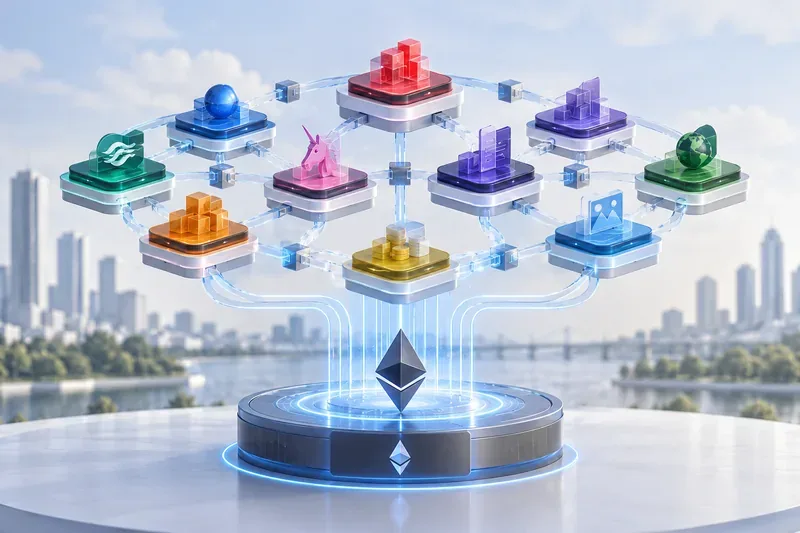
Coin98 Exchange 2.0 ist ein Produkt, das seinen Anwendungsbereich erweitern und vertiefen soll. Derzeit verfügt das Produkt über integrierte Liquiditätsquellen in den Top-9-Blockchains wie Ethereum, BNB Chain, Solana, Polygon, Avalanche C-Chain, KCC, Fantom, Boba Network und Heco Chain und unterstützt Benutzer beim Handel auf mehreren Ketten im Coin98-Produkt.
Einfach und leicht zu bedienen.
Coin98 Exchange 2.0 wurde jetzt mit einer intuitiven, benutzerfreundlichen Oberfläche überarbeitet, die es den Benutzern erleichtert, den Transaktionsprozess des Produkts zu verwenden und besser zu verstehen. Gasfrei, Schlupf, Preisauswirkung, AMM und andere Informationen werden alle deutlich angezeigt.
Gasgebührenoptimierung
In der neuen Version optimiert Coin98 Exchange 2.0 automatisch Token-Swap-Preise, Gasgebühren und Transaktionsgeschwindigkeiten. Je nach Bedarf können Sie die Gasgebühr auch manuell anpassen, indem Sie die Gasleiste anpassen.
Fortschrittlicher Mechanismus
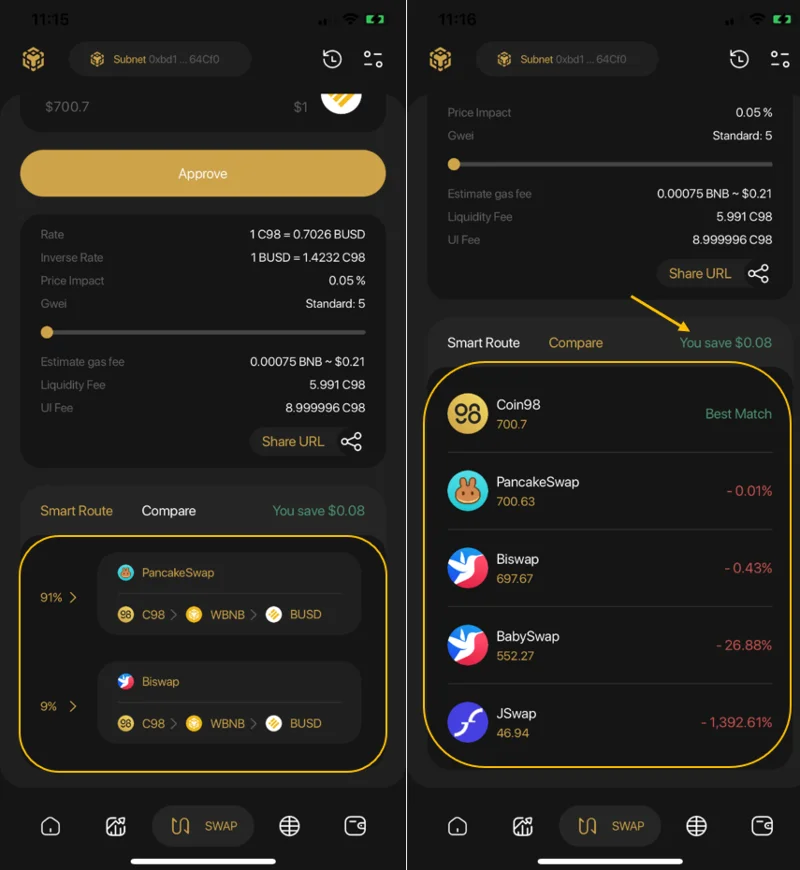
Der Vergleichsmechanismus ermöglicht es Benutzern, Coin/Token-Trades mit dem besten Preis und dem geringsten Schlupf unter den Liquiditätsquellen durchzuführen. Bei jeder Transaktion berechnet der intelligente Routing-Mechanismus, um den Pfad zu erstellen, der den Benutzern hilft, den besten Gewinn in einer Transaktion zu erzielen.
Einzigartige Webseite
Wie andere Funktionen von Coin98'ư-Produkten hat Coin98 Exchange 2.0 auch eine Website, auf der Benutzer von Coin98 Extension diesen brandneuen dezentralen Austausch frei erleben können. Derzeit befindet sich das Produkt in der Entwicklungsstufe. Benutzer können es auf dem nativen Swap der Coin98 Super App ausprobieren.
Kundendienst
Coin98 Exchange 2.0 verfügt über ein Kundendienstteam in 12 verschiedenen Sprachen, das rund um die Uhr auf mehreren Plattformen online ist, darunter 12 Communities für 12 Sprachen auf Telegram.
Was müssen Sie vorbereiten, bevor Sie Coin98 Exchange 2.0 erleben?
Das Herzstück von Coin98 Exchange 2.0 ist die Multichain-Engine, die Benutzer mühelos und reibungslos mit vielen verschiedenen Blockchains verbindet. Benutzer können auch Single-Chain-Wallets wie ETH- oder BSC-Wallets für den Handel verwenden, Coin98 Exchange empfiehlt jedoch die Verwendung von Multi-Chain-Wallets für eine bessere Benutzererfahrung.
Außerdem können Benutzer das einzigartige „Always Connected“-Erlebnis durch die absolute Kompatibilität der Multichain Engine zwischen Coin98 Wallet und Coin98 Exchange genießen.
Laden Sie die Coin98 Super-App herunter und installieren Sie sie
Coin98 Exchange 2.0 ist jetzt in der Coin98 Super App für iOS- und Android-Benutzer verfügbar:
Lesen Sie die detaillierten Anweisungen zur Verwendung der Coin98 Super App oder sehen Sie sich das Tutorial-Video an, um die Coin98 Super App zu installieren
Laden Sie Coin98 Extension Wallet herunter und installieren Sie es
Sie können auf chrome.coin98.com zugreifen , um die Coin98 Extension Wallet zu installieren.
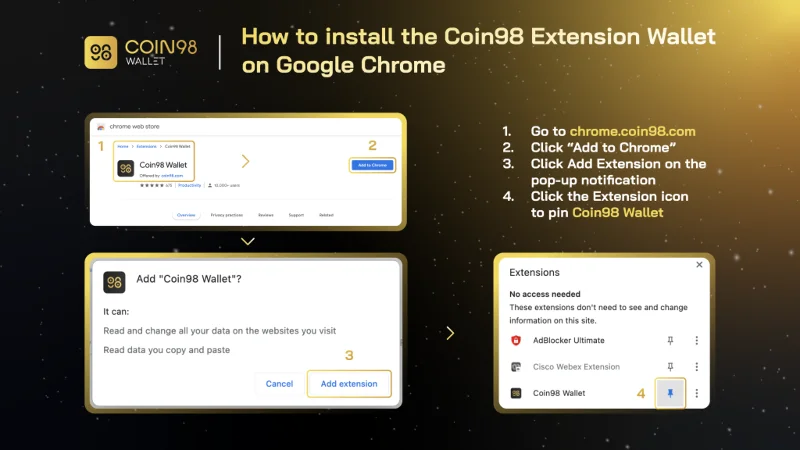
So installieren Sie Coin98 Extension Wallet
Anweisungen zur Installation und Verwendung des Coin98 Extension Wallet finden Sie in dieser Anleitung.
Erstellen Sie eine Brieftasche mit mehreren Ketten
Nachdem Sie das Coin98 Extension Wallet heruntergeladen oder aktualisiert haben, können Sie die nachstehenden Anweisungen befolgen, um ein Multi-Chain-Wallet zu erstellen oder ein Wallet aus anderen Wallet-Anwendungen in Coin98 Wallet zu importieren.
- Wie man hier eine Multi-Chain-Wallet erstellt .
- Hier erfahren Sie, wie Sie ein Multi-Chain-Wallet von Metamask in Coin98 Wallet importieren .
- Hier erfahren Sie, wie Sie ein Multi-Chain-Wallet von Trust Wallet in Coin98 Wallet importieren .
Wenn Sie derzeit ein Coin98-Wallet-Benutzer sind, importieren Sie bitte Ihre Multichain-Wallet erneut, um andere neue Chain-Wallets zu aktualisieren, die in der neuesten Version verfügbar sind!
Bereiten Sie die native Münze der Blockchains für Transaktionsgebühren vor
Um Coin98 Exchange 2.0 nutzen zu können, müssen Sie Gasgebühren für jede Blockchain vorbereiten, die Sie verwenden möchten.
Sie können die nativen Coins auf CEXs wie Binance, Kucoin, … kaufen und in die entsprechenden Wallets abheben, um das Produkt zu erleben. Für Layer-2-Blockchains wie Boba konvertieren Sie ETH bitte in das entsprechende Netzwerk, um es zu verwenden.
Jetzt ist alles bereit, beginnen wir mit dem Handel.
Hinweis: Sie müssen jede Münze in die entsprechende Brieftasche auf der richtigen Blockchain übertragen.
Funktionen von Coin98 Exchange 2.0
Coin98 Exchange 2.0 hat 4 Hauptfunktionen, darunter:
Coin98 Exchange 2.0: Bietet entscheidende Liquiditätsquellen für den vertrauensvollen, genehmigungsfreien und nahtlosen Austausch von Token.
Coin98 Markets: Liefert wichtige Marktdaten zu Kryptowährungen auf ansprechende Weise und versorgt Benutzer mit umsetzbaren Erkenntnissen.
Coin98-Portfolio: Unterstützt Benutzer bei der Überwachung von Preisänderungen und dem Wachstum ihres Vermögens auf 11+ Blockchain.
Das Coin98-Terminal beinhaltet:
- Token Issuer: Erstellen Sie Ihren eigenen Token in nur 1 Minute ohne Programmiererfahrung
- Multi-Sender: Senden Sie mehrere Ausgaben in nur einer Transaktion an verschiedene Adressen.
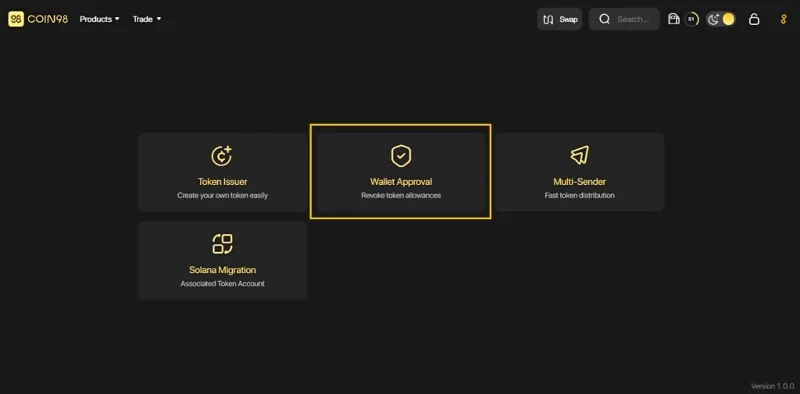
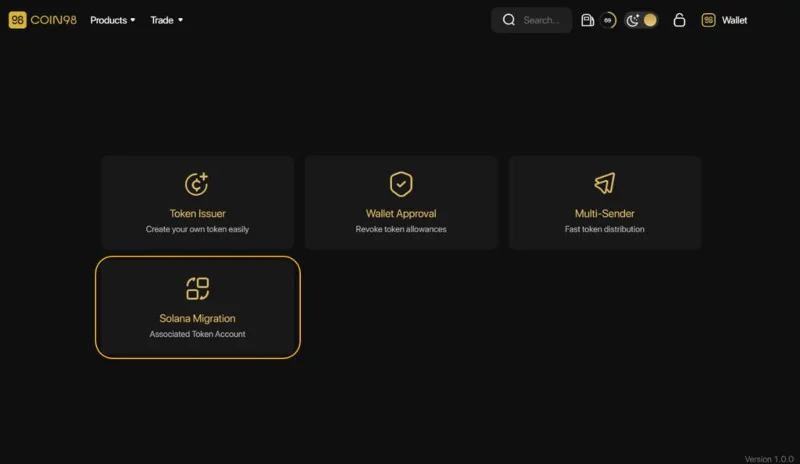
- Wallet-Genehmigung: Widerruf von Token-Zulassungen von dApps auf allen unterstützten Blockchains und Schutz der Benutzer vor potenziellen Verlustrisiken.
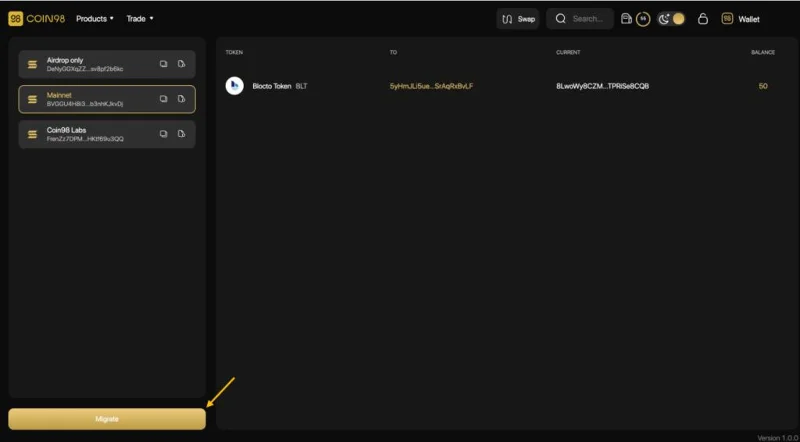
- Solana-Migration: Eine Lösung, die Benutzern hilft, ihre zugehörigen SPL-Token auf eine einzige SOL-Wallet-Adresse zu migrieren und die Fragmentierung der Vermögenswerte der Benutzer bei der Interaktion mit Solana DApps zu verhindern.
Wie man mit Coin98 Exchange 2.0 handelt
Wie funktioniert Coin98 Exchange 2.0?
Der Arbeitsprozess von Coin98 Exchange 2.0 ist wie folgt:
Schritt 1: Wenn Benutzer Token A gegen Token B austauschen möchten, anstatt wie zuvor auf jedes AMM zuzugreifen, wählen Sie jetzt einfach die entsprechende Blockchain zum Handeln aus.
Schritt 2: In diesem Schritt wird Coin98 Exchange 2.0 fortfahren:
- Erhalten Sie Anfragen von Benutzern über Super Link - eine Technologie, die hilft, Transaktionen in Liquiditätspools zu optimieren, aus denen die besten Indikatoren für Benutzer ausgewählt werden können, um maximalen Gewinn bei einem Swap zu erzielen.
- Aggregierte Informationen von AMMs.
Schritt 3: Coin98 Exchange 2.0 bietet die beste Transaktionsoption für Benutzer. Zum Beispiel im Bild unten: 91 % der C98-Token werden über PancakeSwap gehandelt, während die restlichen 9 % mit Biswap getauscht werden.

So handeln Sie mit Coin98 Exchange 2.0 in der Coin98 Super App
Schritt 1: Klicken Sie auf der Hauptoberfläche der Coin98 Super App auf Tauschen.
Schritt 2: Wählen Sie die Blockchain aus. In diesem Artikel wähle ich die BNB-Kette als Beispiel.
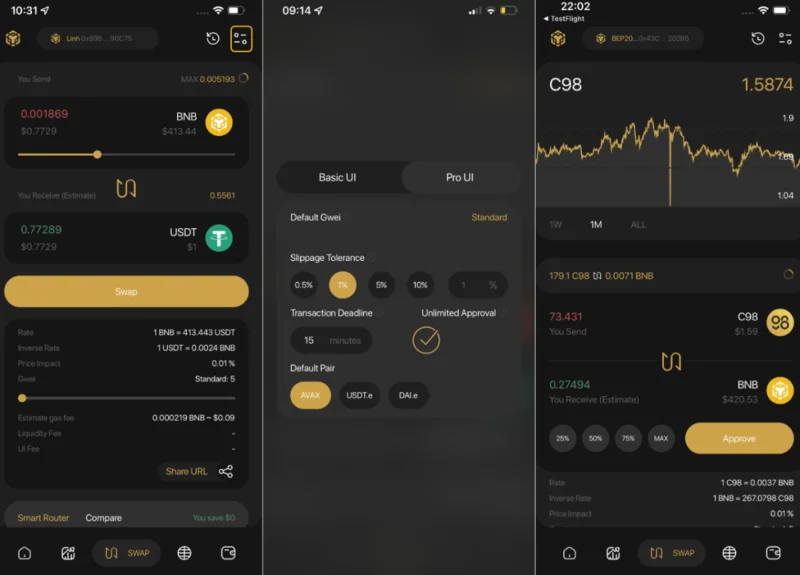
Schritt 3: Klicken Sie auf das Einstellungssymbol in der oberen rechten Ecke des Bildschirms und wählen Sie zwischen 2 Schnittstellenoptionen: der Basis-Benutzeroberfläche und der Pro-Benutzeroberfläche.
Benutzer können in diesem Abschnitt auch die Gasgebühr und Slippage anpassen.
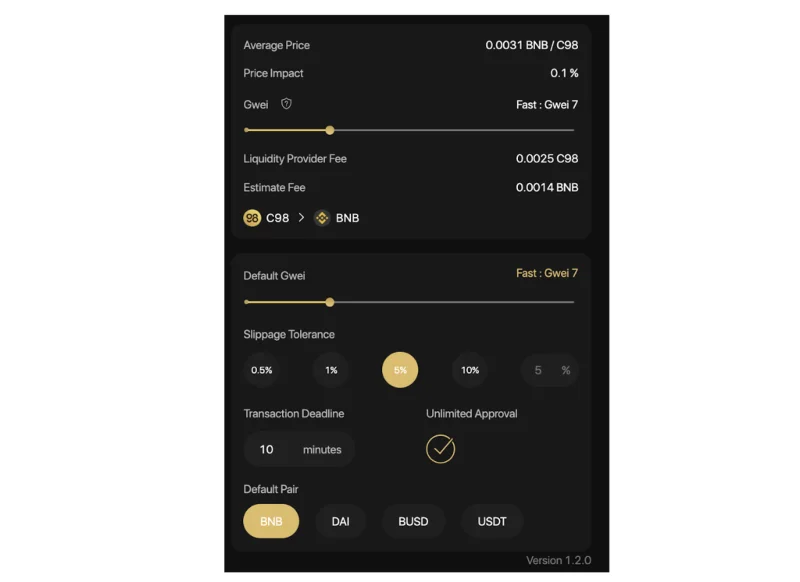
- Slippage Tolerance: Dies ist einer der häufigsten Gründe für Swap-Fehler. Sie können mit der Standard-Slippage-Rate auf der Brieftasche (2%) handeln oder sie anpassen, um die höchste Erfolgsquote zu gewährleisten.
- Transaktionsfrist: Die maximale Transaktionszeit, die Sie angeben können, um den Fall einer langen Wartezeit ohne passende Aufträge zu vermeiden.
- Unbegrenzte Genehmigung: Eine Funktion, die es Benutzern ermöglicht, Plattformen und intelligenten Verträgen die Erlaubnis zu erteilen, Token/Coins in Ihrem Namen unbegrenzt auszugeben.
- Standardpaar: die Standard-Token für jedes Handelspaar.
Der Pfeil in der Mitte der Handelsoberfläche wird verwendet, um zwischen den Kauf- und Verkaufspositionen zu wechseln. Benutzer müssen die Positionen der Token sorgfältig überprüfen, bevor sie Transaktionen durchführen.
Benutzer müssen die folgenden Informationen ausfüllen, um die Transaktion abzuschließen:
- Wählen Sie die Brieftasche mit dem Token/Coin aus, mit dem Sie handeln möchten.
- Wählen Sie das Handelspaar aus der Liste aus.
- Für die Token, die nicht in der Coin98 Super App aufgeführt sind, können Benutzer mit ihren Vertragsadressen handeln.

Schritt 4: Verschieben Sie die Leiste, um den Handelsbetrag anzupassen. Lesen Sie die folgenden Informationen sorgfältig durch, bevor Sie sich für den Handel entscheiden:
- Rate & Inverse Rate: Das Preisverhältnis der 2 Token.
- Preisauswirkung : Geschätzte prozentuale Preisdifferenz beim Tausch im Vergleich zum angezeigten Preis.
- Liquiditätsanbietergebühr: Der Betrag, der zur Zahlung der Liquiditätsanbieter verwendet wird.
- Gwei-Leiste: Eine Funktion, mit der Benutzer die Höhe der Gasgebühr (Transaktionsgebühr) entsprechend ihren Bedürfnissen anpassen können, indem sie die Leiste verschieben.
- URL teilen: Teilen Sie das Handelspaar per URL.
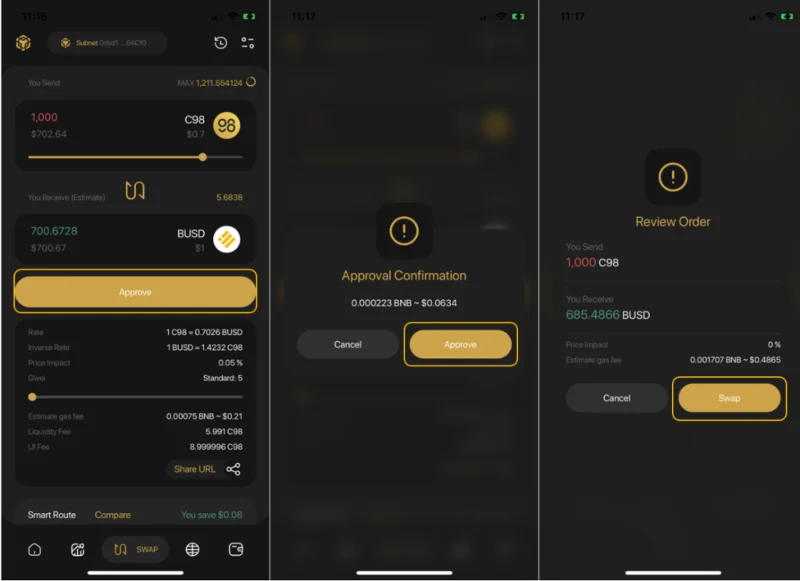
Schritt 5: Klicken Sie zum Abschluss auf Genehmigen (zum ersten Mal) → Tauschen .

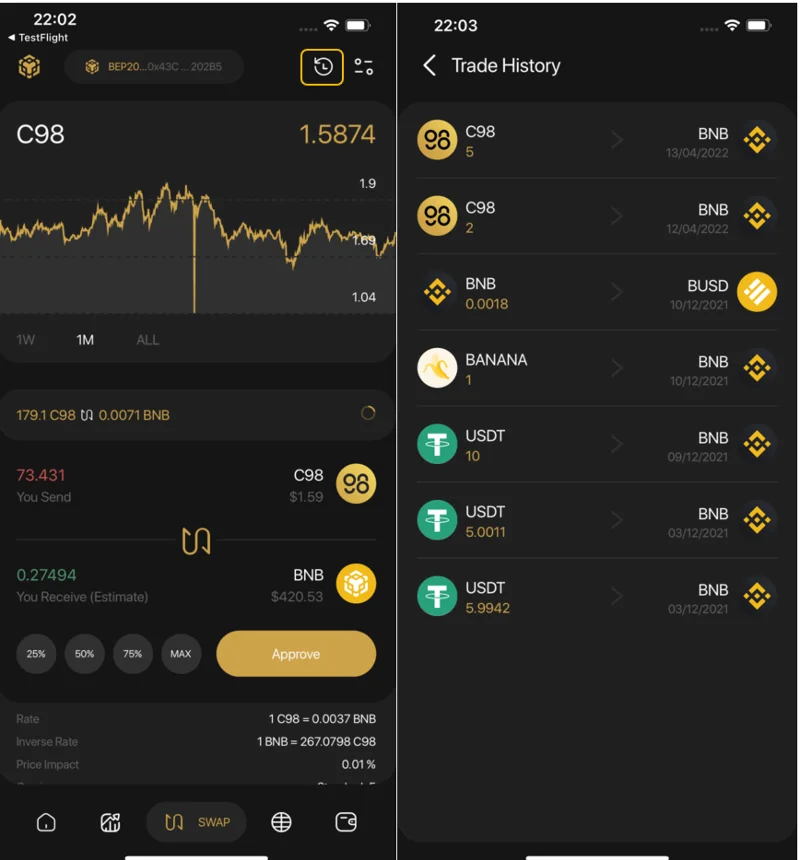
Nach erfolgreichem Austausch können Benutzer über die Tauschoberfläche auf die Handelshistorie zugreifen , um ihre Transaktionen anzuzeigen, oder zum Startbildschirm zurückkehren, um die gehandelten Token bei Bedarf zu überprüfen.

Notiz:
- Die Standardgasgebühr für die Coin98 Super App wurde auf den Standardsatz festgelegt, der die optimalste Geschwindigkeit zu einem vernünftigen Preis bietet.
- Die Genehmigung muss nur für die erste Transaktion durchgeführt werden. Bei den folgenden Transaktionen müssen Sie nur auf Tauschen klicken .
- Die Coin98 Super App erhebt für jede Transaktion eine Gebühr von 0,8 % auf den Token-Swap.
Wie man an der Coin98-Börse handelt
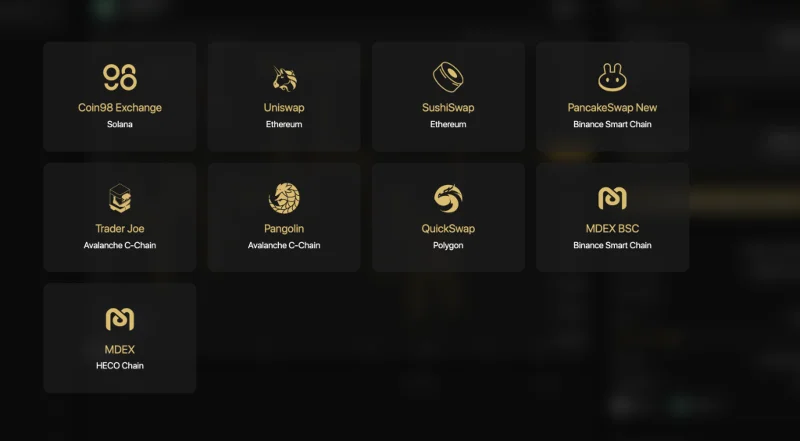
Coin98 Exchange ist stets bestrebt, so viele führende AMMs wie möglich in den Markt zu integrieren, darunter Uniswap & SushiSwap (Ethereum), PancakeSwap (V2) & MDEX (Binance Smart Chain), MDEX (HECO Chain), Pangolin & Trader Joe (Avalanche C -chain), QuickSwap (Polygon), Coin98 Exchange (Solana) und mehr … was Benutzern ein nahtloses Transaktionserlebnis über verschiedene Blockchains hinweg mit einer einzigen Multi-Chain-Wallet und ohne Änderung des Netzwerks ermöglicht.
Zunächst können Sie hier auf Coin98 Exchange zugreifen: exchange.coin98.com
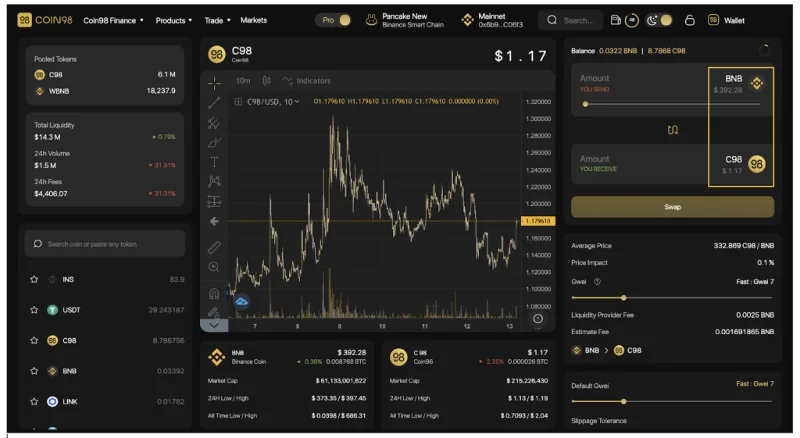
Überblick über die Coin98 Exchange-Schnittstelle
Coin98 bietet Benutzern 2 Arten von Schnittstellen:
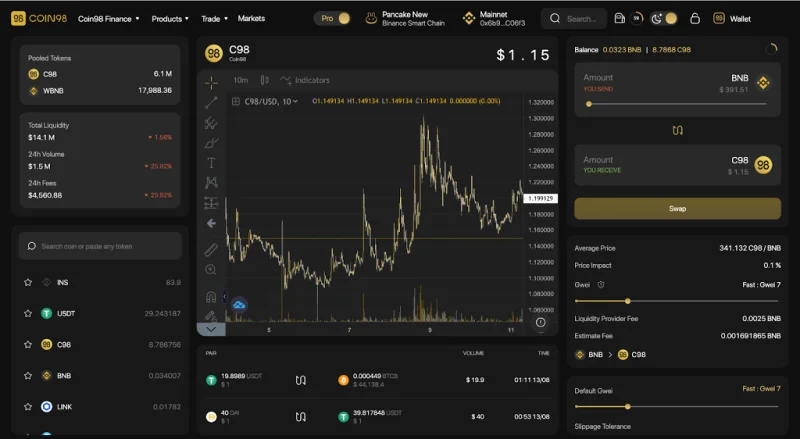
Die Pro-UI mit detaillierten Handelsinformationen und Funktionen für aktive Händler und fortgeschrittene Benutzer

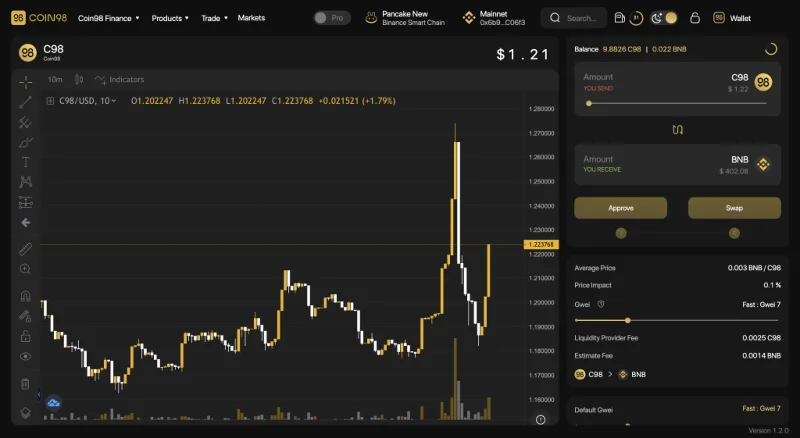
Die Basic - Benutzeroberfläche mit einer optimierten Benutzeroberfläche, die sich auf Einfachheit, Geschwindigkeit und Benutzerfreundlichkeit konzentriert, was Coin98 Exchange zur perfekten Wahl für Krypto-Neulinge, Erstbenutzer und Benutzer macht, die nur die Grundlagen benötigen.

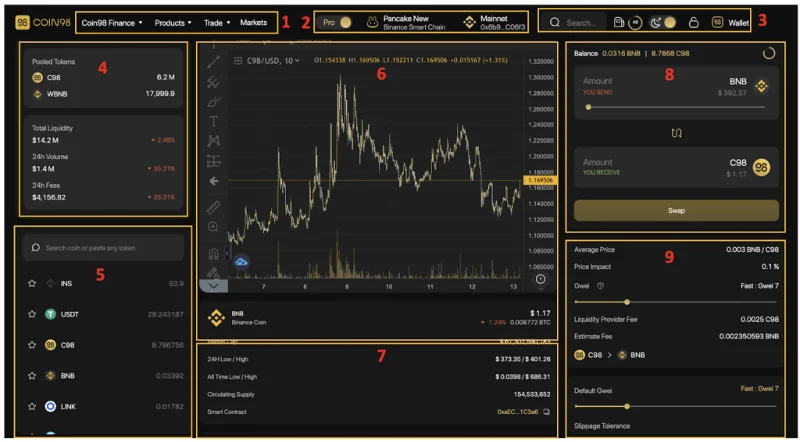
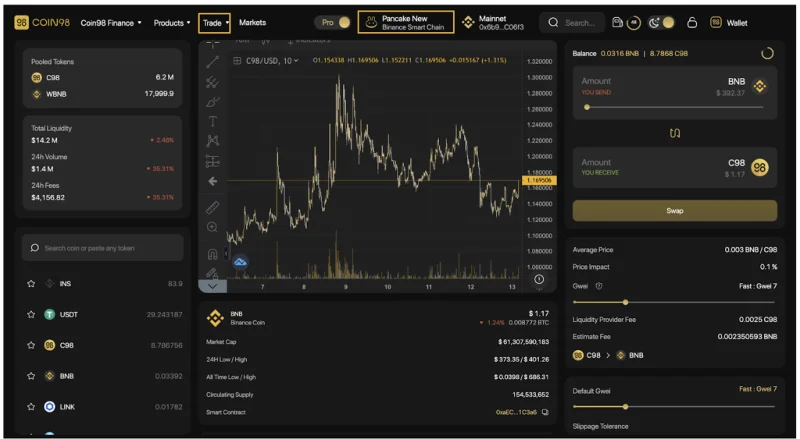
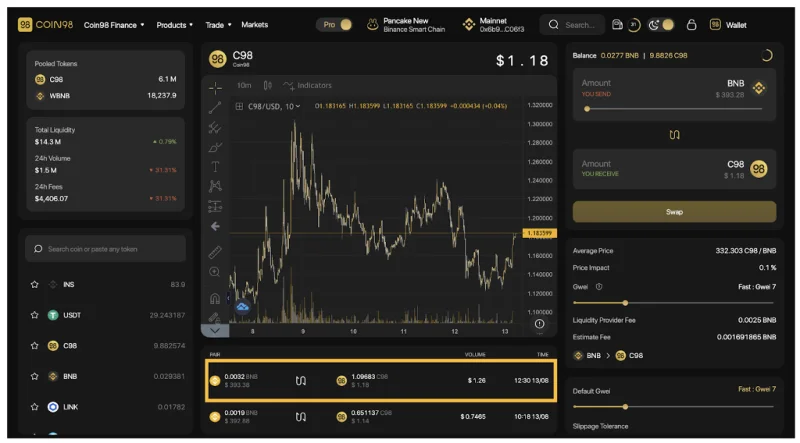
Die Hauptschnittstelle von Coin98 Exchange hat die folgenden Abschnitte:

[1] Navigation zu anderen Websites, Produkten und AMMs von Coin98 von Coin98 Exchange.
[2] Von links nach rechts:
- Ein Kippschalter zum Wechseln zwischen der Pro-UI-Oberfläche und der Basic-UI-Oberfläche.
- Der DEX-Auswahlbereich.
- Das mit Coin98 Exchange verbundene Wallet (Sie können zwischen Wallets wechseln, wenn es mehr als 1 gibt).
[3] Einige integrierte Dienstprogramme:
- Die Suchleiste: Suchen Sie die Token mit ihren Namen, Symbolen oder Smart Contract-Adressen.
- Das Tankstellensymbol: Echtzeit-Gwei.
- Das Mondsymbol: Helle und dunkle Schnittstelleneinstellungen.
- Das Schloss-Symbol: Wallet sperren/entsperren.
- Brieftasche: Brieftasche verwalten und Token empfangen/senden.
[4] Informationen zu den 2 ausgewählten Tokens im Pool:
- Aktuelle Anzahl der Token im Pool.
- Gesamtliquidität : Die aktuelle Gesamtliquidität im Pool in USD.
- 24-Stunden- Volumen: Das gesamte Handelsvolumen des Pools innerhalb von 24 Stunden, % der Veränderung innerhalb von 24 Stunden.
- 24-Stunden-Gebühren: Die gesamte Swap-Gebühr des Pools in 24 Stunden, % der Änderung innerhalb von 24 Stunden.
[5] Der Token-Auswahlbereich.
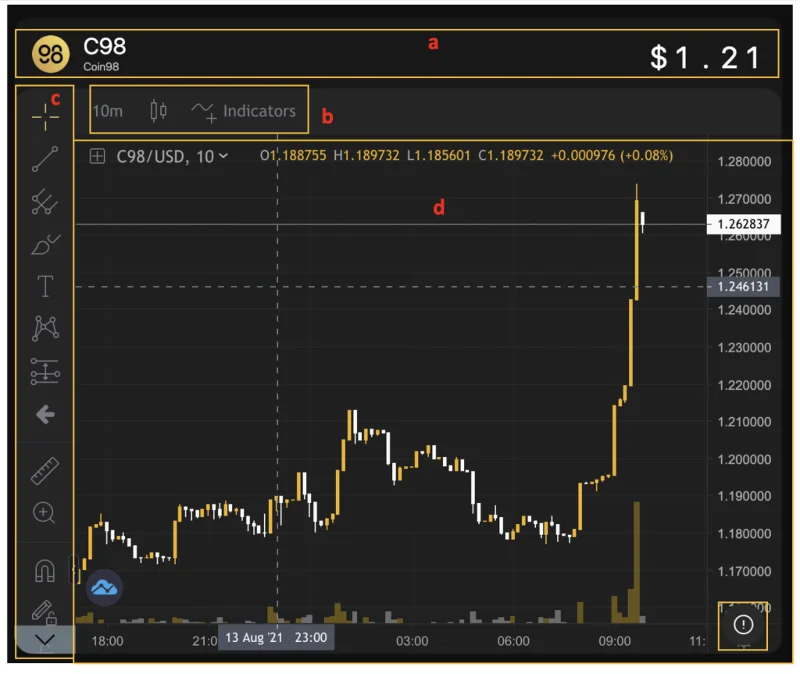
[6] Das Preisdiagramm des Tokens, das Sie tauschen möchten, einschließlich:

- [a] Name, Aufkleber, Logo und Echtzeitpreis des getauschten Tokens.
- [b] Anpassung der Wiedergabezeit (1 Minute bis 1 Woche), verfügbare indikatorbezogene Tools, Arten von Kerzen.
- [c] Die Zeichen- und Messwerkzeuge. Um diese Tools verwenden zu können, müssen Sie jedoch über Kenntnisse in der technischen Analyse verfügen.
- [d] Der größte Bereich, in dem das Preisdiagramm platziert ist und wo alle Tools angewendet werden, zeigt die Indikatoren für die Preisanalyse.
Benutzer können auf das Symbol (!) in der unteren linken Ecke des Preisdiagramms klicken, um weitere Informationen zum Token anzuzeigen.

[7] Historie der Transaktionen.
[8] Der Transaktionsbereich.
[9] Die Transaktionsinformationen sowie die wichtigsten Einstellungen:
- Durchschnittspreis: Das durchschnittliche Preisverhältnis der 2 Token.
- Price impact: The difference between the market price and the estimated price provided by the Liquidity Pool.
- Gwei: Can be considered as the transaction fee - a payment made by users to complete transactions on blockchains.
- Liquidity Provider Fee: The fee you have to pay to the liquidity provider
- Estimate Fee: The estimated transaction fee that you have to pay for the network.
Advanced Settings:
- Gwei bar: A feature that allows users to adjust the amount of Gas fee (transaction fee) according to their needs by sliding the bar.
- Slippage tolerance: The pricing difference between the price at the confirmation time and the actual price of the transaction users are willing to accept when swapping on AMMs. Slippage tolerance is set as a percentage of the total swap value.
- Transaction Deadline: The maximum transaction time that you can specify to avoid the case of long waiting time without any matching orders.
- Unlimited Approval: A feature that enables users to grant platforms and smart contracts the permission to spend tokens/ coins on your behalf without limit.
- Default Pair: The default tokens for each trading pair
- Contract revoke: Allows you to inspect all contracts you've approved to spend money on your behalf and revoke their access for the ones you no longer need. The example shows that I have allowed PancakeSwap (V2) to use a very large amount of USDT, if I feel it is not necessary, I will click on the crossed-out icon on the right.

A simple guide on how to trade on Coin98 Exchange
Step 1: Select the AMM you want to trade with by clicking on one of the two highlighted sections on the screen.

In this case, I will take PancakeSwap (V2) as an example.

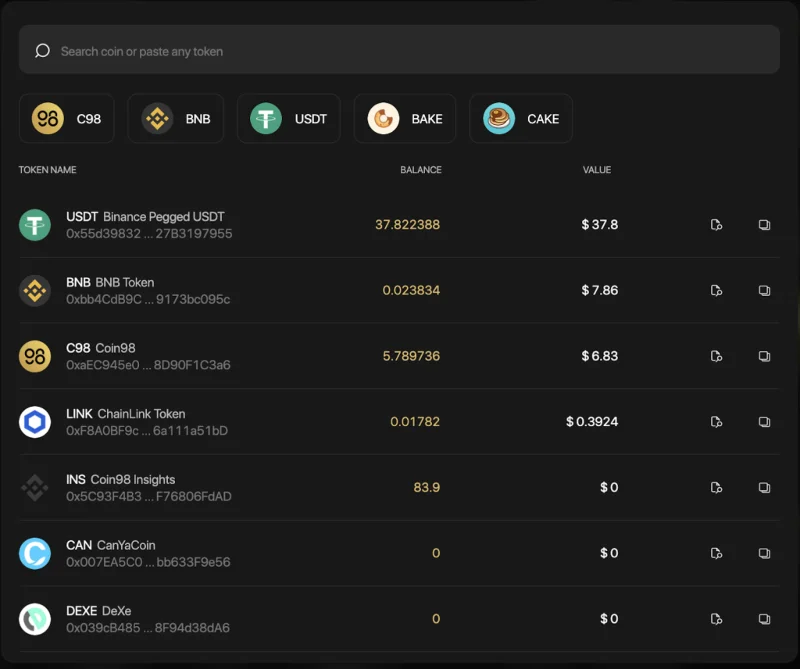
Step 2: Select the token you want to trade from the token search bar.

For new tokens that have not been listed on Coin98 Exchange, you can paste their Contract addresses and trade as usual.

I will take the USDT-C98 trading pair as an example.
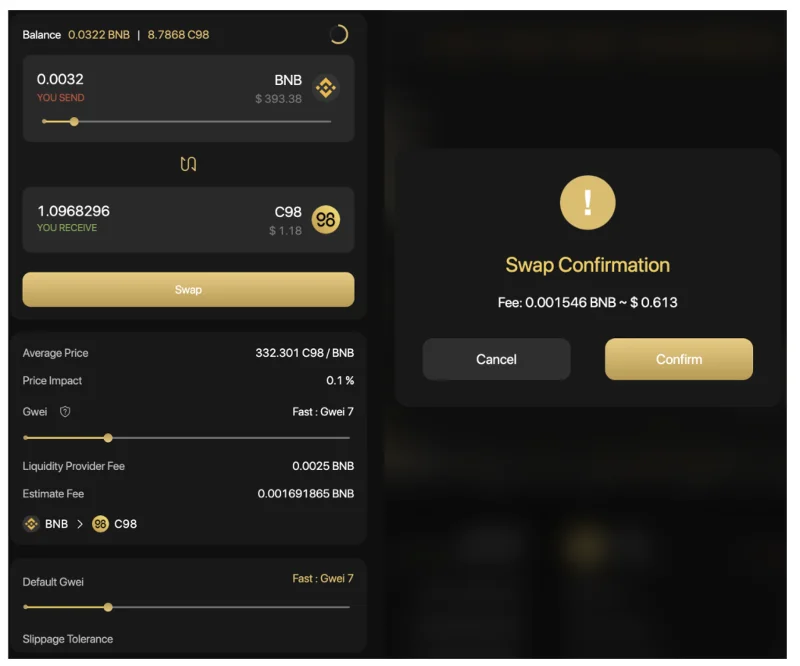
Step 3: At the transaction area, you can:
- Slide the bar or enter the desired amount of tokens you want to trade.
- Adjust the Gwei bar according to the desired speed. The default gas fee on Coin98 Wallet has been set for the highest speed with the most reasonable cost.
- Adjust the Slippage tolerance according to the desired slippage. The default slippage tolerance on Coin98 Wallet is set at the standard rate of +/-5%, which is quite safe and applicable to most coins on the market.
- Adjust the Transaction Deadline according to the desired waiting time. The default transaction deadline on Coin98 Wallet is set at the standard rate of 10 minutes.
- Click Swap.
Step 4: Click Confirm to confirm that you agree with the fee and are ready to make this transaction.

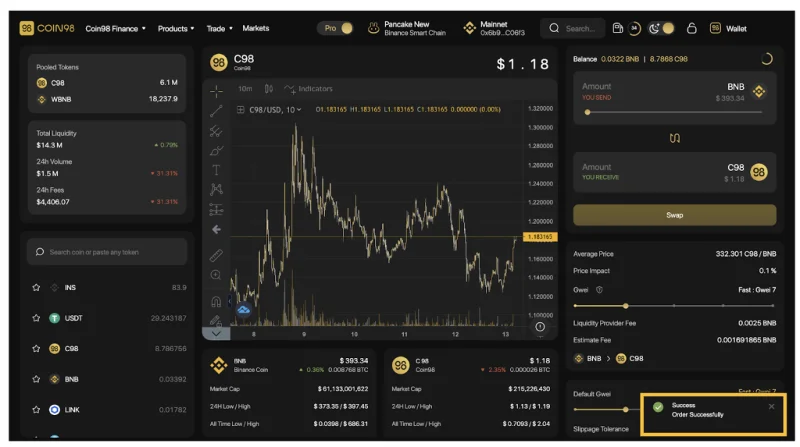
When the transaction is completed, you will receive a notification at the bottom right corner of the screen.

Note:
- The arrow in the middle of the trading interface is used to switch between the buying and selling positions. You need to check the tokens’ positions carefully before making any transactions.
- The gas fee and the processing time are different on each blockchain. You need to double-check the information carefully before approving any transaction.
- After swapping successfully, you can access the Pair section to view your transactions.
- Coin98 Exchange charges 0.3% fee on the swap amount in each transaction.

In the future, Coin98 Exchange will integrate more top-tier AMMs and cross-chain bridges to elevate users' trading experience to a new level.
During the Swap process, if you want to learn more about a certain coin/token, you can use the Coin98 Markets feature right in your browser.
How to use Coin98 Markets
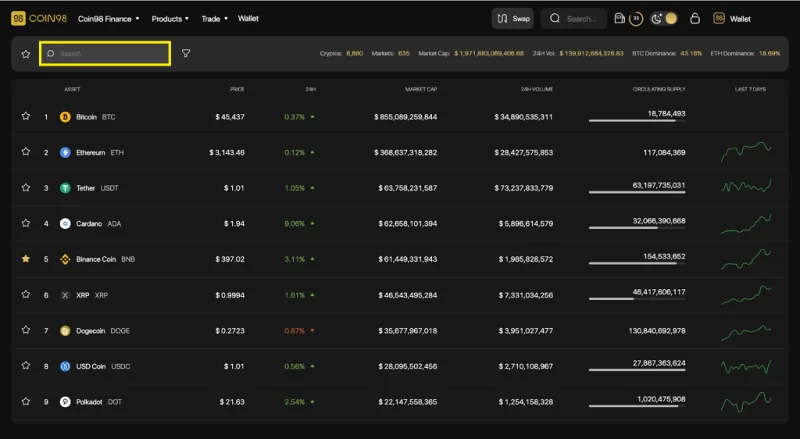
Coin98 Markets is a tool that aggregates real-time, detailed, and useful market data that assists users in monitoring the market changes and fluctuations, from which appropriate investment decisions can be made.
Coin98 Markets is now tracking over 9,600 coins/tokens and over 660 exchanges. Via Coin98 Markets, users can gain understanding and objective perspectives of a coin/token to make appropriate investment and trading decisions.
Overview of the Coin98 Markets interface
Similar to the trading interface on Coin98 Exchange, before going into the detailed instructions, I will introduce to you the metrics as well as the main interface of Coin98 Markets.
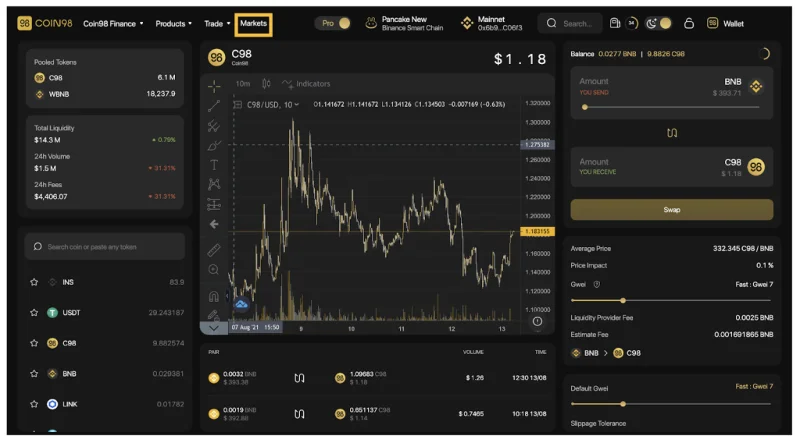
From the Coin98 Exchange interface, you can click Markets on the navigation bar at the top of the page, or access Coin98 Markets via: markets.coin98.com.

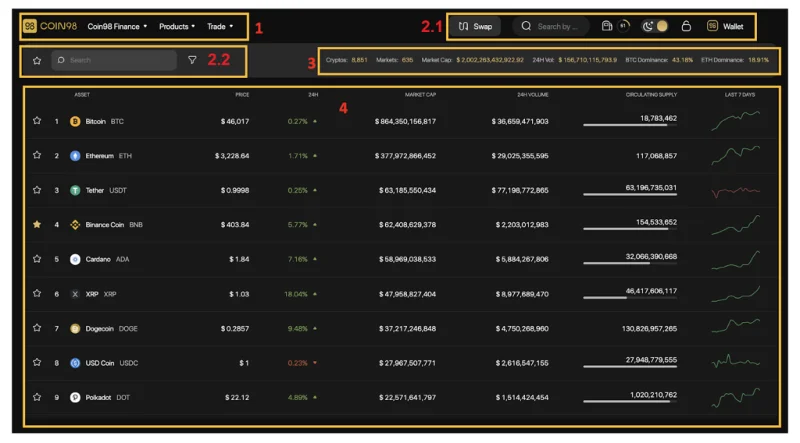
The main interface of Coin98 Markets has the following sections:

[1] Navigation to other Coin98's sites, products and AMMs of Coin98 Exchange.

[2] Some built-in utilities:
- The Search bar: Search the tokens with their names, symbols, or smart contract addresses.
- The Gas station icon: Real-time Gwei.
- The Moon icon: Light and dark interface settings.
- The Lock icon: Lock/Unlock the wallet.
- Wallet management and receiving/sending functions.

- The Star Icon: Click on this icon to show your favorite list of coins/tokens.
- The Filter button: Filter by tokens/coins ranking, Market Cap (Market capitalization), and Volume order.

[3] Market Fundamental metrics:
- Cryptos: The total number of coins & tokens being tracked on Coin98 Markets.
- Markets: The total number of the exchanges being tracked.
- Market Cap (short for Market Capitalization): The total market capitalization of the entire crypto market.
- 24H Vol (short for 24 hours Volume): The Cryptocurrency trading volume in the last 24 hours.
- Dominance: Dominance index of coins/ tokens, here showing 2 popular coins, Bitcoin (BTC) and Ethereum (ETH).

[4] Basic information about Coins/Tokens:
- The Star icon: Used to mark your favorite coins/tokens. When marked, this icon will turn yellow.
- Ordinal numbers 1,2,3,...: The ranking of coins/tokens by market capitalization.
- Asset: Coins/tokens sorted by market cap.
- Price: The real-time price of the coin/token.
- 24H: Change of coin/token price in one day.
- Market Cap: The market capitalization of that coin/token.
- 24H volume: The trading volume of that coin/token in the last 24 hours.
- Circulating Supply: The best approximation of the number of coins that are circulating in the market and in the general public's hands.
- Last 7 days: The Waveform chart showing the price volatility over 7 days.

How to view token/coin information on Coin98 Markets
Step 1: Search token/coin you want to view on Coin98 Markets.

Step 2: Click on the token/coin you want to learn about.

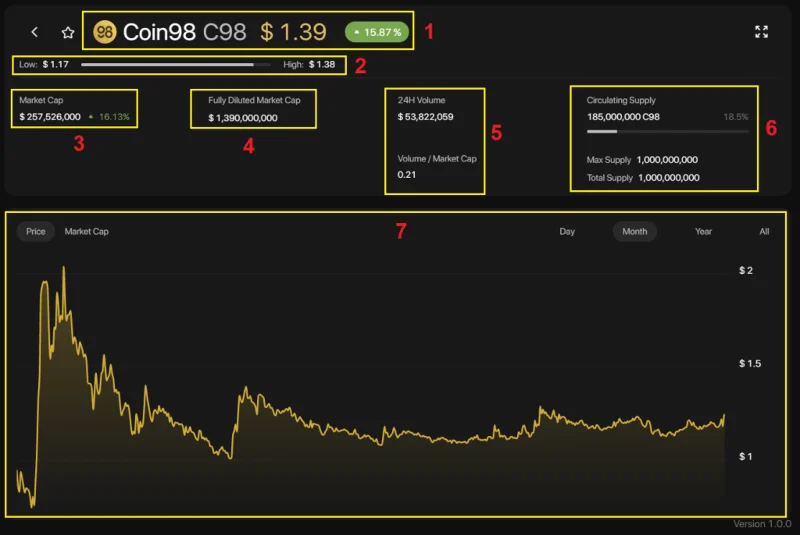
Step 3: The system will display the full information about the coin/token you have selected with some details as follows:

[1] Name and ticker of the token/coin, current price and % of price change within 24 hours
[2] Low - High bar: The highest and lowest price within 24 hours of the chosen coin/token.
[3] Market Cap and % change of Market Cap within 24 hours
[4] Fully Diluted Market Cap: Total market capitalization when all tokens are unlocked.
[5] With 2 information about Volume:
- 24H Volume: The total volume of transactions within a day.
- Volume/Market Cap: the ratio of trading volume to market capitalization within 24 hours.
[6] Supply metrics:
- Max Supply: The best approximation of the maximum amount of coins that will ever exist in the lifetime of the cryptocurrency.
- Total Supply: The total supply of coin/token currently on the market (minus the verifiable amount of coin/token burned).
- Circulating Supply: The best approximation of the number of coins that are circulating in the market and in the general public's hands and the % of the maximum total supply of coins/tokens in circulation.
[7] The price chart and the capitalization value of the chosen token/coin by day (Day), month (Month), Year (Year), and the entire time (All) view.
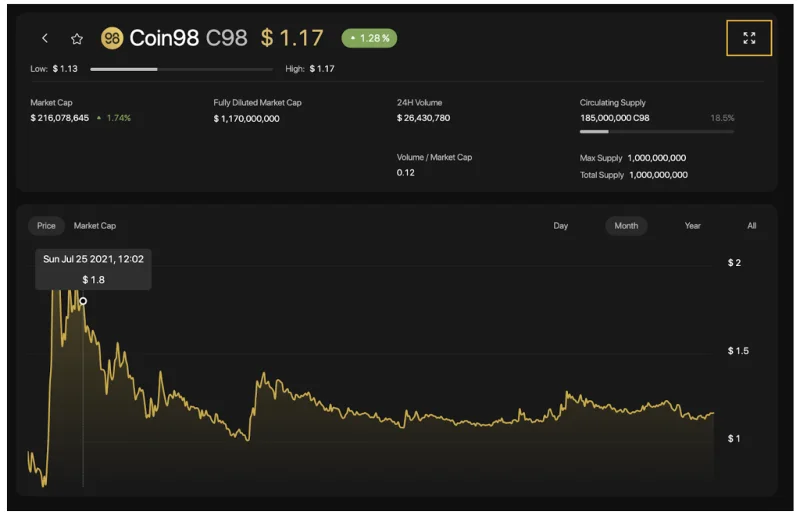
In addition, users can also use the Expand View mode by clicking on the arrow icon on the top right of the screen.

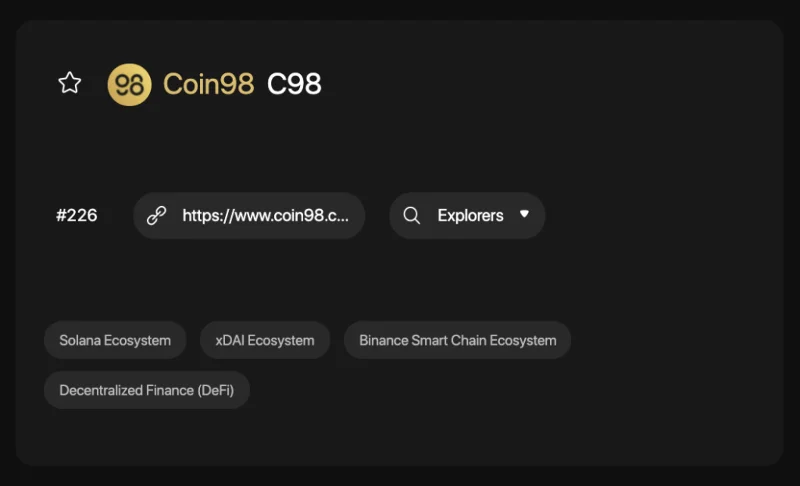
In this interface, you can see other information such as:

- The official website of the project
- Explorer: Detailed Information about the token/coin on respective blockchains.
- Community: The official community of the project.
- Tags related to the project information.
After researching the tokens/coins and trading them successfully you can directly manage your asset portfolio right on Coin98 Portfolio.
How to use Coin98 Portfolio
Coin98 Portfolio - a one-stop tracker for all your coins, has supported tracking portfolio for the following top-tier blockchain addresses: Solana, Ethereum, BSC, HECO, Avalanche C-Chain, Tron, TomoChain, Near, Polkadot, Kusama, and Celo, ... easily and conveniently. You only need to insert the wallet addresses to track without the need for Passphrases and Private Keys
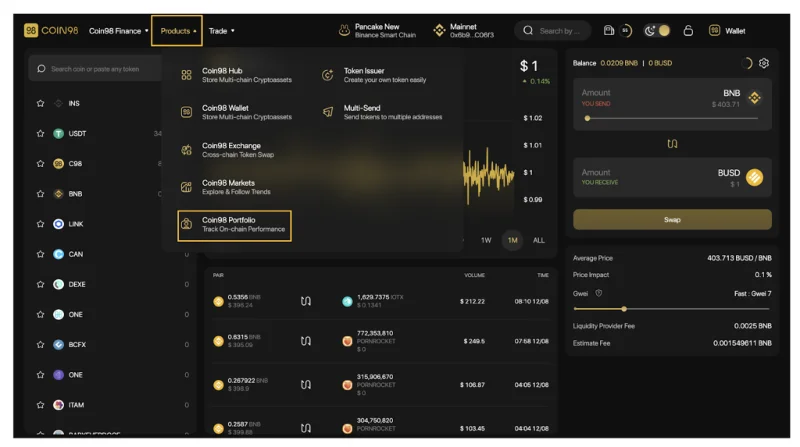
To use Coin98 Portfolio, from the Coin98 Exchange/ Coin98 Markets interface, you can click on the Products navigation bar at the top of the page, select Coin98 Portfolio or visit this link: portfolio.coin98. com

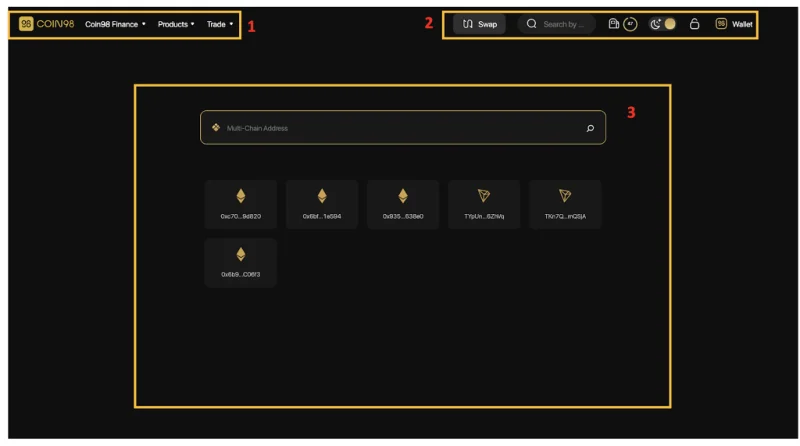
The main interface of Coin98 Portfolio has the following sections.

[1] Navigation to other Coin98's sites, products and AMMs of Coin98 Exchange.

[2]: Some built-in utilities:
- The Search bar: Search the tokens with their names, symbols, or smart contract addresses.
- The Gas station icon: Real-time Gwei.
- The Moon icon: Light and dark interface settings.
- The Lock icon: Lock/Unlock the wallet.
- Wallet management and receiving/sending functions.
[3] The Search box: This is the main feature of Coin98 Portfolio. You only need to insert the wallet addresses you want to track, no need for Passphrases and Private Keys. Coin98 Portfolio also supports saving recent addresses to make it easier for users to manage their assets.
Here are two simple steps you need to follow to use Coin98 Portfolio:
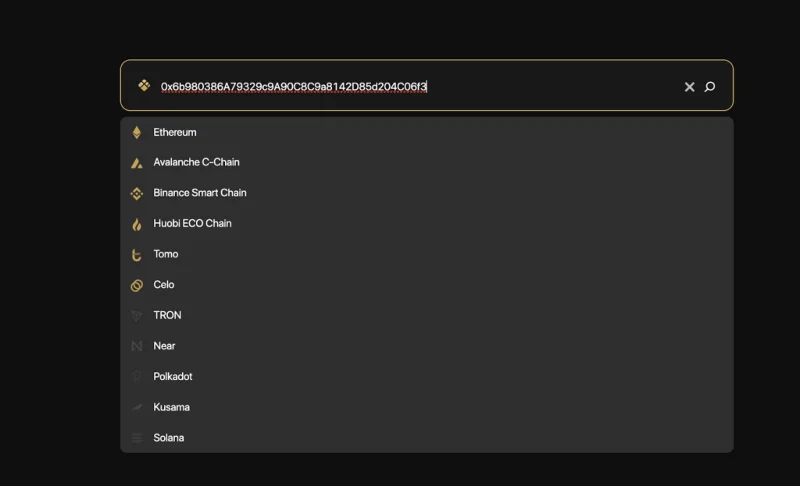
- Step 1: Enter the wallet address into the Search box.
- Step 2: Coin98 Portfolio will automatically detect and suggest the corresponding chain. If it is a multi-chain address, there will be suggestions on which chain you should select.

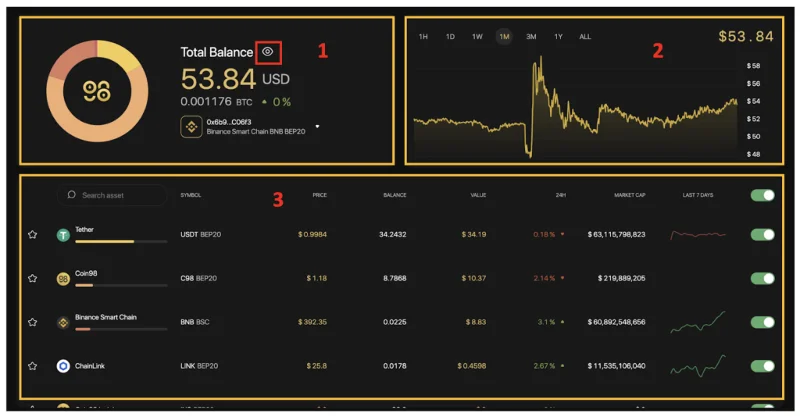
After you have inserted all of your wallets, here is what your portfolio looks like.

The main information includes:
[1] The total balance:
- Asset value in USD and in BTC.
- User's portfolio weight and % increase/decrease in 24 hours.
- For multi-chain wallet addresses, you can easily change the network to check the asset portfolio on different blockchains.
- The "Hide balance" feature keeps your asset safe by preventing prying eyes (or intruders) from knowing how much your account holds.
[2] The Balance chart: You can choose any time frame, from 1 hour - 1 year or the whole time.
[3] The Assets portfolio: Full information about each token you are holding such as price, total value, value changed in 24 hours, volume,.... To hide/show any token you can use the on/off icon on the right.
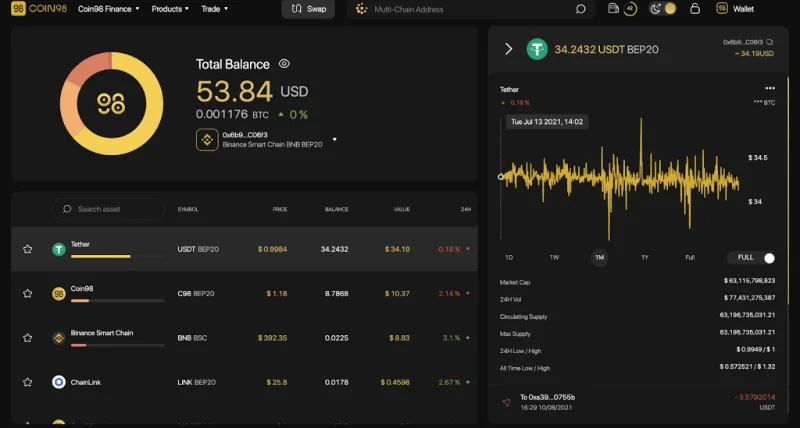
Moreover, you can click on a token to see its basic information popped up on the right side of the screen.

The main information includes:
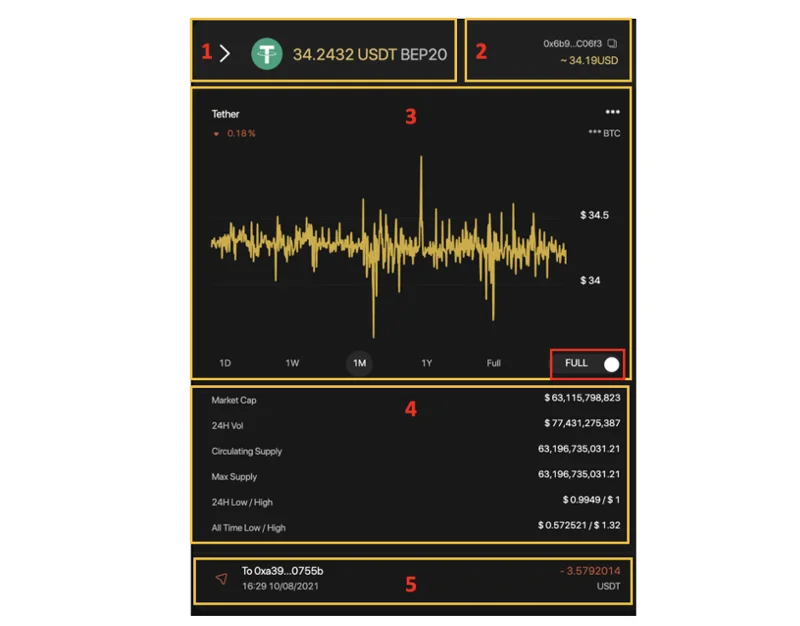
[1] The token sticker, the standard and the token amount.
[2] Token wallet address, value in USD.
[3] The graph showing the total value of a token or the price of a token unit over time. To change the chart you can use the toggle button in the right corner of the chart. You can choose multiple time frames, from 1 hour - 1 year or the whole time.
[4] Token Information overview.
[5] Token transaction history on the wallet address you are choosing. You can click on each transaction to check the information on Explorer tools such as BscScan, EtherScan, ....

Besides the three main features mentioned above, Coin98 Exchange also offers an additional set of utility tools called Coin98 Terminal.
How to use Coin98 Terminals
Coin98 Terminal (Utilities) is a set of utility tools to enable users to easily become a part of the DeFi world in a convenient way, including Token Issuer, Multi-send, and Multisig (coming soon).
Token Issuer
Token Issuer is a feature that allows users to issue their own tokens easily and conveniently. Currently, Token Issuer is supporting on 3 main chains: Ethereum, HECO, and Binance Smart Chain. In the near future users can also experience this tool Tron (TRC10) and Solana.
To issue a new token on Token Issuer, follow those steps:
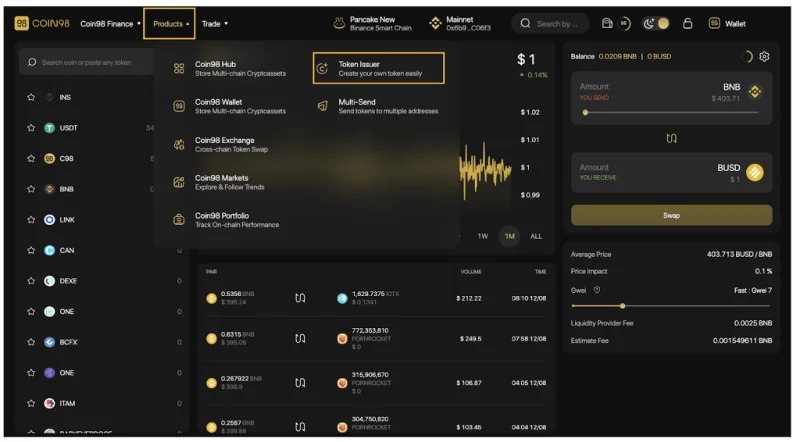
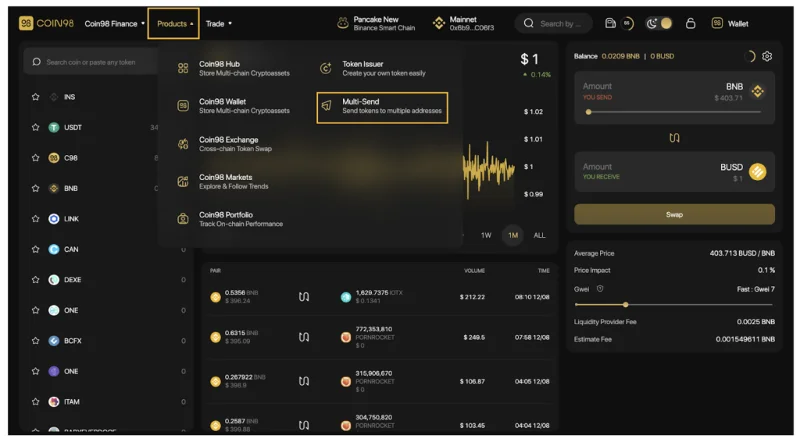
On the Products navigation bar at the top of the page, select Coin98 Issuer or visit the link: terminals.coin98.com/issuer

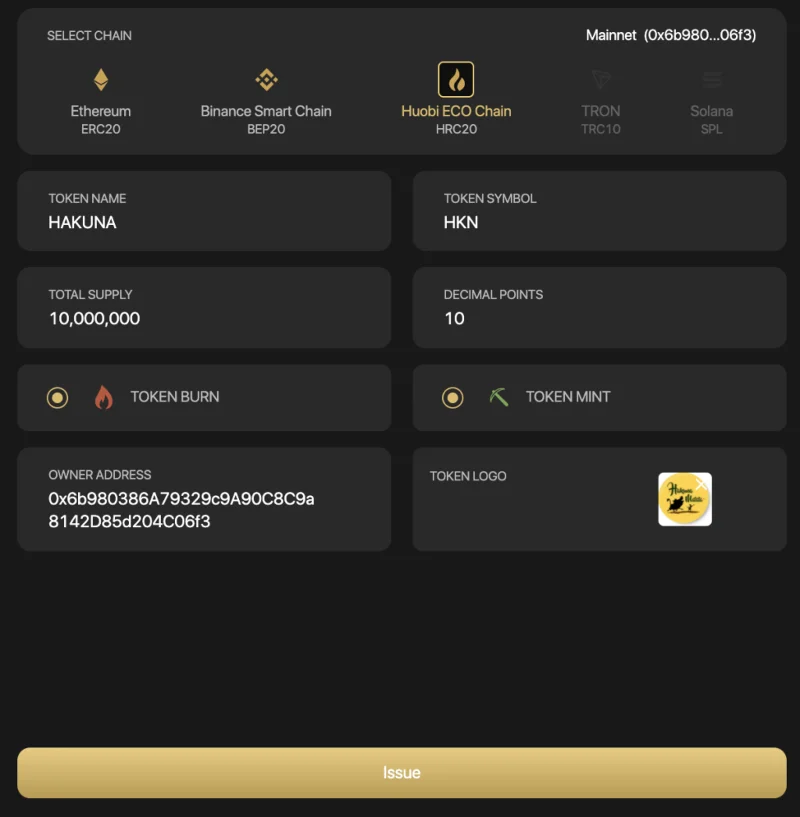
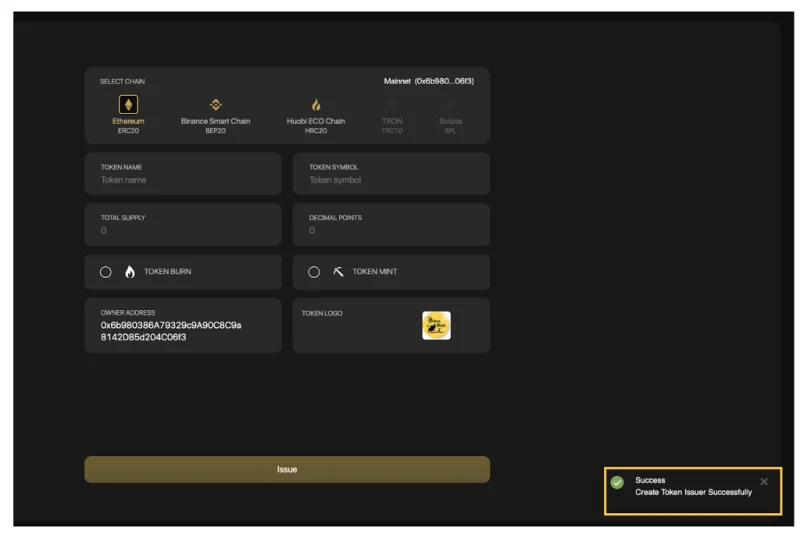
Step 1: Select the network that you wish to issue tokens, in this example I chose the HECO Chain (HRC20). The system would find your respective chain wallet.
Step 2: Fill in the following information:

- Token name: The name of the token
- Token symbol: The symbol of the token in upper case (cannot be more than 5 characters).
- Total supply: The total amount of tokens you wish to issue.
- Decimal Points: The number of decimal places in the token's unit.
You can consider two options after issuing the token:
- Token Burn: This check specifies whether your tokens can be burned to decrease the supply
- Token Mint: This check specifies whether your tokens can be created to increase the initial supply.
- Token logo: Click on the plus icon to upload the token's logo.
- Owner Address: The address receiving the issued tokens. The system will automatically fill in the connected wallet address but you can still use another wallet address.
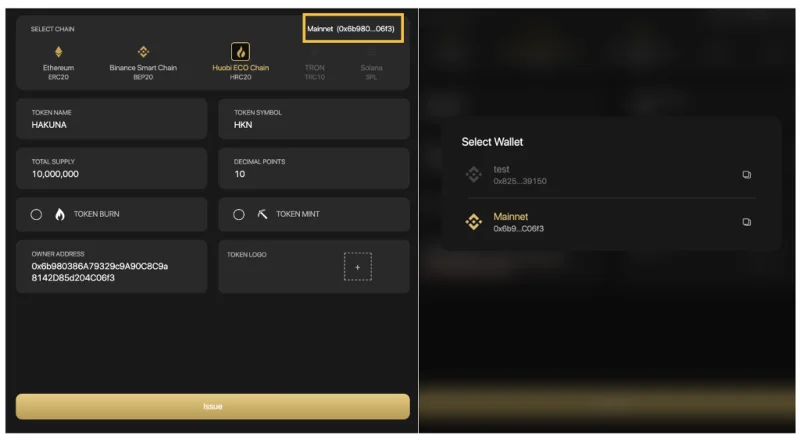
To change the address of your connected wallet, you can do the following steps:
- Select the wallet address on the top right corner of the screen.
- Select the wallet you want to connect.
Step 3: Click Issue.

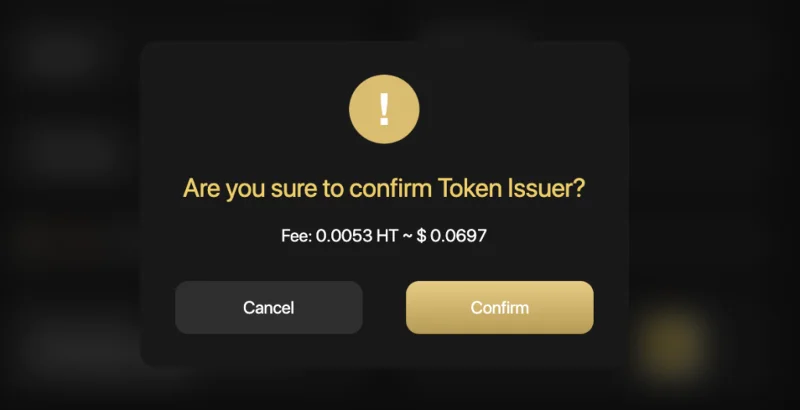
Step 4: The system will ask users to pay a network fee to issue tokens.
Users need to prepare enough fees for this step. If you agree, click Confirm on the pop-up confirmation.

There will be a pop-up announcement in the bottom right corner to redirect you to EtherScan/BscScan/Hecoscan to view your token information.

Multi-sender
Multi-sender is a feature allowing users to send coins/tokens to multiple addresses at the same time, on the following blockchains: Binance Smart Chain, Solana, Ethereum, Polygon, HECO Chain, Klaytn, GateChain, Celo, OKExChain, Tomochain, xDAI, Avalanche (C-chain), Fantom.
To access Coin98 Multisend, click on the Products navigation bar at the top of the page, select Coin98 Multisend or visit the link: terminals.coin98.com/multisend

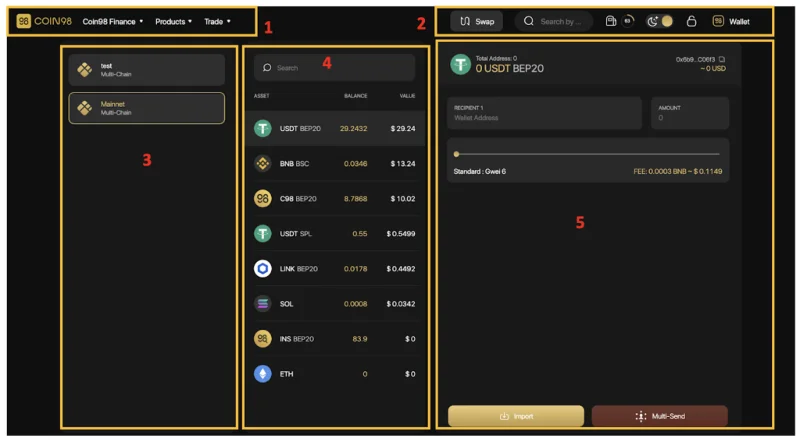
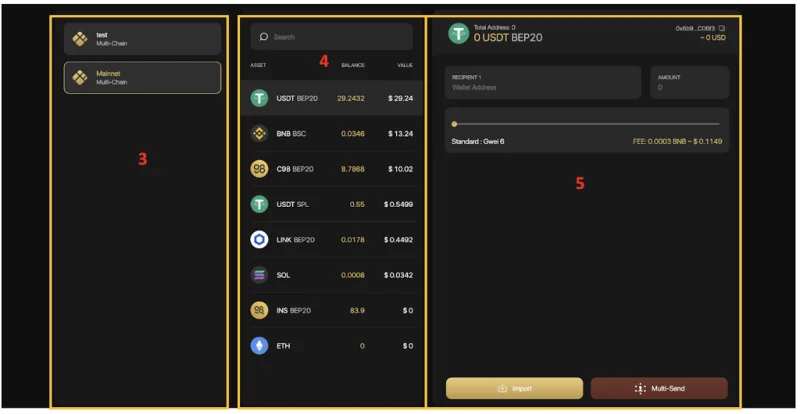
The main interface of Coin98 Multisend has the following sections:

To experience the Multi-send feature, you can follow these steps:
[1] Navigation to other Coin98's sites, products and AMMs of Coin98 Exchange.

[2] Some built-in utilities:
- The Search bar: Search the tokens with their names, symbols, or smart contract addresses.
- The Gas station icon: Real-time Gwei.
- The Moon icon: Light and dark interface settings.
- The Lock icon: Lock/Unlock the wallet.
- Wallet management and receiving/sending functions.

[3] The wallet selection area.
[4] The token selection area.
[5] The main area to send tokens.

In the area where you can send tokens, follow those steps:
Step 1: Enter the recipient's wallet addresses. There are 2 ways to do it:
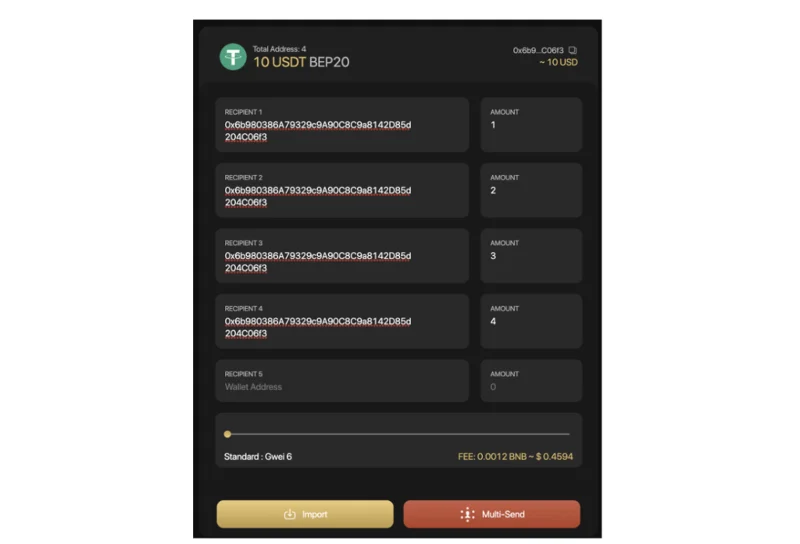
- Enter each wallet address manually (Recipient 1, 2, 3,...) and the corresponding deposit amount (Amount) in each box.

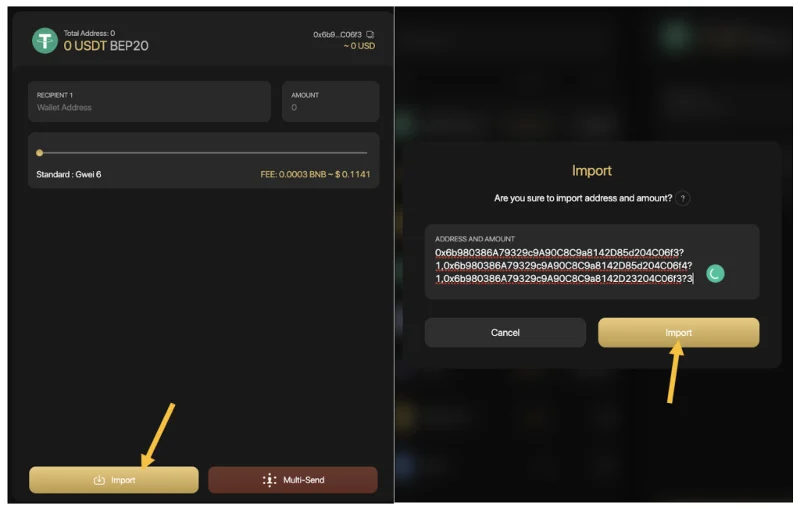
- Select Import. Enter the amount of tokens/ coins following the syntax: wallet address?number,wallet address?amount
Eg: 0xbe80ceed72e1798c631fcd92f611367abd7f836f?0.5, 0x52c12e10f181f801324ed3c3cd6d17f58a93e6b8?1, 0x5a7b52cf2f59d072aa38dee1107612ad656e048e?0.75

Step 2: Slide the gas bar to reach the desired gwei → Click Send to complete.

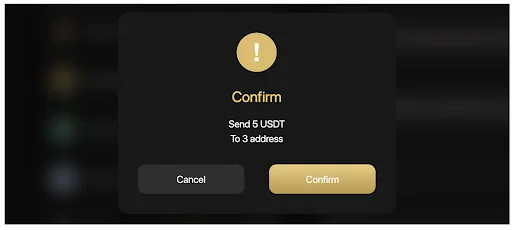
If you agree with the sending information, click Confirm.

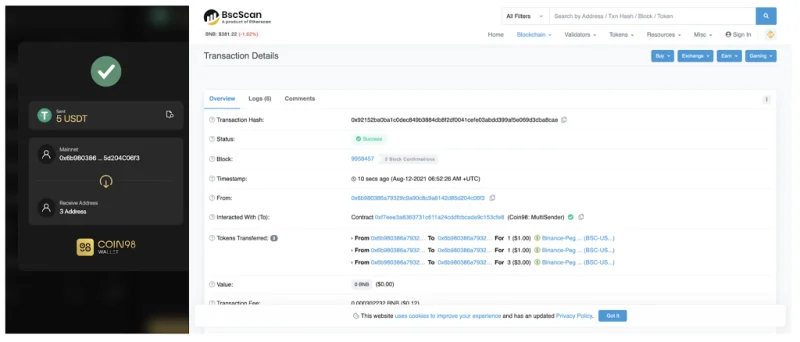
After sending successfully, you can access the Token History on Coin98 Extension Wallet or Coin98 Portfolio to view your transactions.To view further information of the transactions, you can also check on Explorer browsers (Etherscan, BscScan, ...).

Note:
- The default gas fee on Coin98 Wallet has been set for the highest speed with the most reasonable cost.
- Users need to have a proper amount of native tokens on the corresponding blockchains for the gas fees. For example, gas fees on Ethereum are paid with ETH, on Binance Smart Chain are paid with BNB and on Solala are paid with SOL.
- Except for the multi-send feature on Solana can be applied to 20 addresses. The multi-send feature on other blockchains can be applied to an unlimited number of addresses.
- To enhance user's experiencesCoin98 Wallet allows users to send SOL to multiple addresses and send SPL tokens to SOL addresses natively without having any SOL in the wallet.
- If the receiving wallet's balance > 0, the system will automatically retrieve and create an SPL wallet for the users.
- If the receiving wallet's balance = 0, the system will automatically ask the sender to pay a fee to create a new SPL wallet for the recipient.
Wallet Approval
Wallet Approval is a feature allowing you to inspect all the contracts you've approved to spend money on your behalf and revoke their access for the ones you no longer need.
Why should you use Wallet Approval tool?
In order to trade, farm, stake, or interact with any dApps, users are required to allow smart contracts to access your assets. There are 2 approaches to allowance: Allow for a specific amount of tokens and unlimited approval.
- Allow for a specific amount of tokens: Users give access to a particular amount of tokens for smart contracts of DApp. It can not exceed the maximum tokens that you grant.
- Unlimited approval: It means that users provide a smart contract with full permission of your funds.
Unlimited approval brings them a fast and frictionless experience; however, it might potentially affect the risk of asset loss if users interact with untrustworthy platforms or scamming pools.
It is recommended not to grant unlimited access to a platform to keep your funds safe.
How to revoke token allowances
Step 1: Access Coin98 Terminal
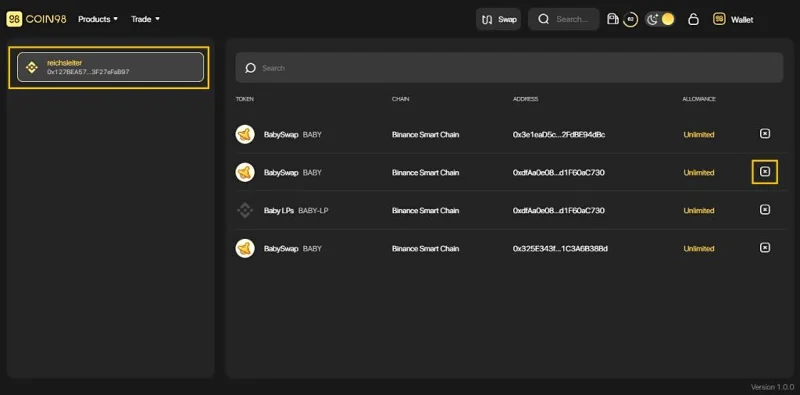
Step 2: Select Wallet Approval on the main screen to start revoking token.

Step 3: Click to a wallet you often interact with DeFi services.
Step 4: In this interface, you can revoke the permission of any desired contract by clicking on the [x] icon.

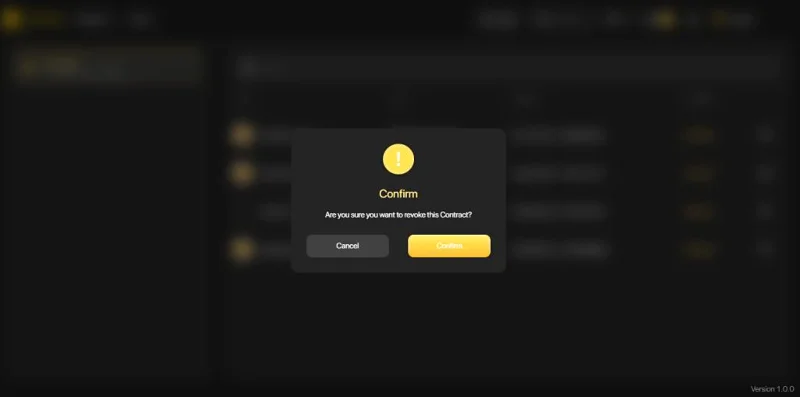
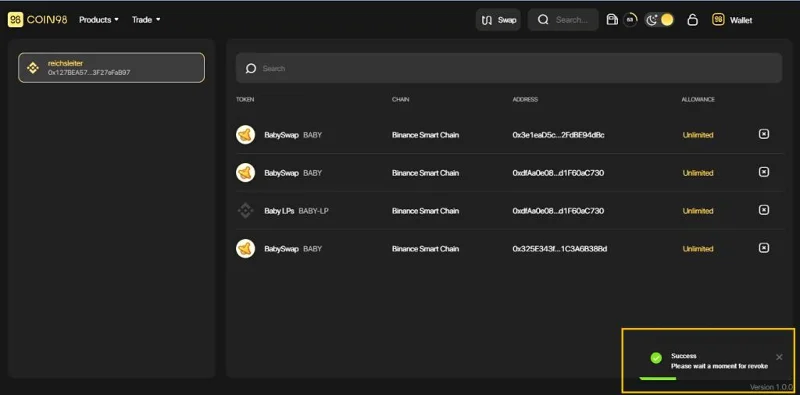
Step 5: Click Confirm for completion and wait for seconds. All done!

Once completed, the system will display a message in the lower right corner of the screen.

Note:
- This revocation will take you a small network fee; please ensure you have enough parent tokens on the wallet.
- You can choose any wallet that interacts with the DApp to experience the Wallet Approval feature by clicking on the default wallet area.
Solana Migration
Unlike other Blockchains, SOL addresses and SPL addresses are totally different, making it hard for users to utilize. If users send SPL tokens to SOL addresses, the network will automatically initiate another SPL address instead of navigating to the existing Wallet. That is the main reason why assets are divided into many single SPL addresses.
Solana Wallet Migration is a solution that helps users to migrate their associated SPL tokens to a single SOL wallet address and prevent the fragmentation of users’ assets when interacting with Solana DApps.
How to migrate fragmented SPL tokens to an SPL wallet
Step 1: Access Coin98 Terminal.
Step 2: On the home screen, choose Solana Migration to start the migration process.

Step 3: At this screen, you can check:
- The tokens are being stored in more than one SPL address and their amount.
- The current address and the newly initiated address after Migration.
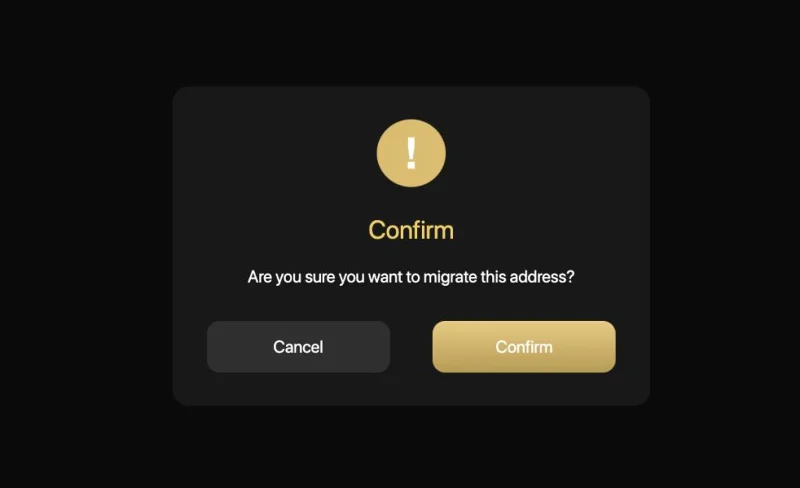
Click the Migrate button to start the process

Then choose Confirm and wait for seconds to complete the process.

Notes:
- Users only use this tool when they have a token appearing in many SPL tokens on the same Solana Wallet; in other words, can’t use to migrate the SPL tokens in different Solana wallets.
- This migration process will take a minor network fee, which SOL charges to confirm the transaction.
Upcoming features on Coin98 Exchange
Besides the outstanding features that I introduced above, in the future, the Coin98 Exchange universe will also launch the following features:
- Integrating more new blockchains: Based on the current multi-chain engine platform, in the future Coin98 Exchange will make efforts to connect with new blockchains enabling users to experience most of DeFi services in the most seamless way..
- Aggregating liquidity from reliable sources on multiple blockchains: The increase in the diversity of liquidity sources helps Coin98 Exchange optimize the slippage tolerance as well as transaction fees, making trading on DeFi easier.
- Launching Multi-chain Staking and Yield Farming: Allowing users to stake and farm both LP tokens and single-sided tokens on multiple blockchains, enabling users to easily receive attractive rewards.
- Launching Cross-chain Swap (Space Gate): Supporting users to swap and transfer assets between different blockchains. More specifically, Space Gate will build bridges to swap native tokens, instead of wrapping tokens.
- Adding Multisig features to Coin98 Terminal: a multi-signature wallet - a feature that enhances asset security, allowing users to store assets more securely.
- Providing access to NFTs: Besides supporting coins/tokens on 25+ different blockchains, Coin98 Exchange will offer users an easy way to store, send and receive all NFT assets in one place and in the safest and most convenient way.
Stay tuned for the guides on how to use these features in the next articles.
Final Thought
Through this article, I hope that you have gained an overview of the basic steps to trade on Coin98 Exchange. I believe the features integrated on this All-in-one platform will bring users optimized speed at the lowest cost possible.
If you have any questions or get into trouble using Coin98 Exchange, please feel free to comment below and join Coin98 Community to discuss your problem with admins!